
1. FlashClaw: Your AI Employee in the Cloud (Beta)
##Definition
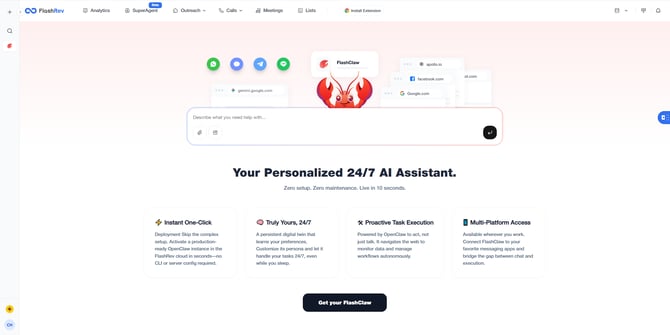
FlashClaw operates within your dedicated FlashRev Cloud Computer—a pre-configured, always-on cloud environment where your AI employee lives and works, with complete privacy by design. Every user gets an isolated, secure workspace.
##Key Highlights
-
Zero Deployment Effort: Hire your FlashClaw with one click. Public Beta is now open for Superagent Operator plan users and above.
-
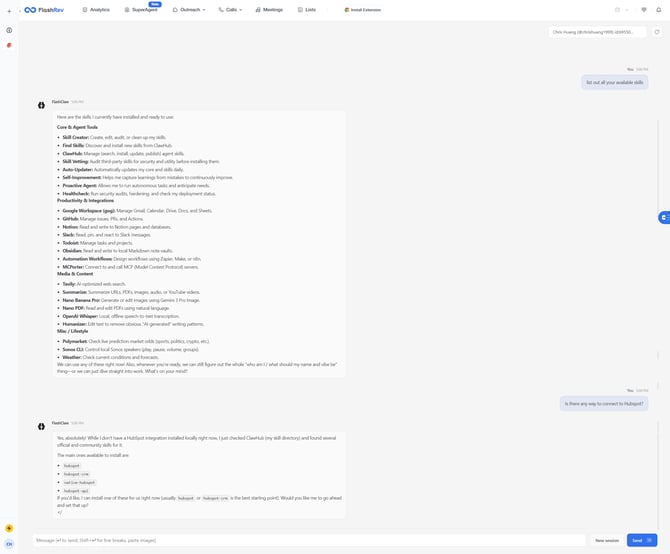
Out-of-the-box Skills: Comes with pre-installed core skills and connects to the ClawHub Skills marketplace. Easily install new abilities to research topics, manage emails, make calls, or deploy code.
-
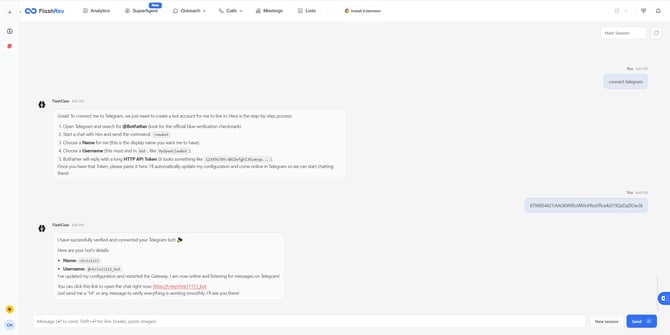
Seamless IM Integration: Connect FlashClaw to where your team already works: WhatsApp, Telegram, Teams, Slack, and more. Complete the binding through simple conversational prompts.
-
Autonomous Execution: FlashClaw handles every step of a project just like a real employee would. Just message what you need done, and witness the results.
2. [SMS] Manual SMS Reassignment
##Background
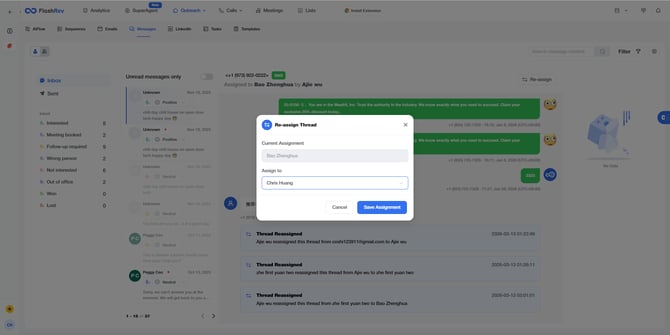
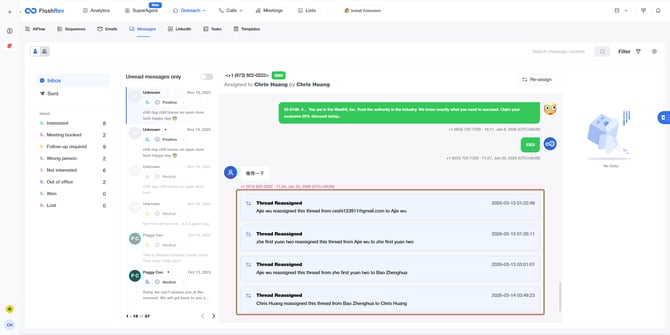
Previously, SMS replies were assigned based on automated inbox message assignment rules. However, in cases of agent leaves or departures, admins needed a way to manually reassign these conversations to ensure no lead is left unattended.
##Comparison
| Dimension | Before | After |
| Flexibility | Relied solely on automated rules; no manual intervention. | Manual Override: Admins/Owners can manually reassign followers. |
| Transparency | Changes in ownership were not logged within the thread. | Traceable History: System cards are added to the thread to log reassignments. |
| Continuity | SMS replies might go unhandled during personnel shifts. | Seamless Handoff: Quickly assign new agents to maintain communication. |
##Key Changes & Features
-
Role-Based Access:
-
This feature is exclusively available to Admin and Owner roles.
-
-
Reassignment Workflow:
-
Admins can trigger the "Assign" action from the SMS Thread to select a new follower.
-
-
Real-time Updates:
-
Follower Metadata: The follower information is instantly updated upon successful reassignment.
-
System Message Cards: A new message card is automatically injected into the SMS thread, providing a clear record of who initiated the change and who the new owner is.
-
##Core Value
-
Guaranteed Continuity: Prevents lead leakage during staff transitions or absences.
-
Enhanced Managerial Control: Empowers management to optimize resource allocation and maintain full visibility over communication handoffs.
3. [Email] Unibox Enhancement: Contact Activity Search via Email
##Background
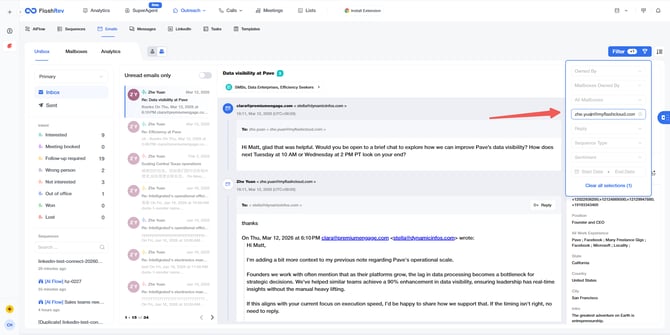
In complex sales environments, contacts are often scattered across various Lists and Sequences, making it difficult for users (such as Torro) to have a centralized view of a contact's complete interaction history (Email, SMS, Calls, etc.). To address this, we have introduced a global search capability based on email addresses within the Unibox module.
##Comparison
| Dimension | Before | After |
| Search Convenience | Required navigating through multiple sequences; no cross-dimensional search. | Centralized Entry: Locate all relevant conversations directly in Unibox via email. |
| Filter Dimensions | Lacked specific filters for sender or recipient email addresses. | New Targeted Filters: Added "Receive from" and "Sent to" filters. |
| Matching Efficiency | Relied on manual scrolling through fragmented threads. | Instant Location: Filter a contact's entire thread history by entering their email address. |
##Key Changes & Features
This update adds specific search criteria to the Filter section in the
Email - Unibox module:-
Inbox View:
-
Added "Receive from" filter. Users can input a specific email address to display all incoming conversations from that contact.
-
-
Sent View:
-
Added "Sent to" filter. Users can input a specific email address to display all outgoing records sent to that contact.
-
-
Interaction Rules:
-
Search Logic: Currently supports Exact Match only, ensuring high relevance and accuracy of search results.
-
Coverage: Includes all Email Thread records associated with the specified email address.
-
##Core Value
-
360-Degree Communication View: Provides a "fast track" for SDRs and Managers to backtrack the interaction history of any specific contact.
-
Operational Efficiency: Resolves the pain point of searching for contacts across fragmented sequences, making Unibox the true hub for managing contact activities.
4. Contact Lifecycle: Condition-Based Automation Engine
##Definition
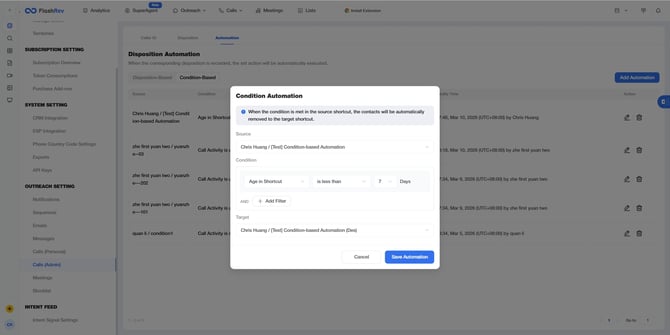
Contact Lifecycle is a powerful automation engine that enables admins to define sophisticated flow logics based on real-time contact status and interaction data. It shifts from simple "trigger-action" models to a Scheduled + Composite Condition evaluation framework, ensuring precise lead movement between business pools (Shortcuts/Projects/Sequences).
##How it Works
-
Scheduled Execution: The engine runs a global audit daily at 18:00 (BJT).
-
Source-to-Destination Flow: Automatically removes contacts from a source node and adds them to a destination node based on rule matches.
-
Composite Conditions: Supports complex logic combinations across multiple dimensions:
-
Time-based: Aged in current shortcut/sequence.
-
Call Activity: Dialing records and connection status (e.g., Answered vs. Unreached).
-
SMS/Email Activity: Distinguishes between Outbound effort and actual Inbound responses.
-
##Strategic Use Cases (Example: Torro)
-
Lead Tiering: Moving leads that have aged > 7 days with zero "Inbound" engagement from "First Contacts" to a "Mining List" to protect sales reps' efficiency.
-
Stall Detection: Automatically re-routing contacts from a "Docs Out" sequence back to a dialer if no two-way communication occurs within a specific window.
##Core Value
-
Efficiency Protection: Filters out stale or non-responsive data to keep high-performing teams focused on high-conversion leads.
-
Response-Driven Automation: Moves beyond "action-based" triggers to "engagement-based" lifecycle management.
5. LinkedIn Automation V2.0: Stability Upgrade
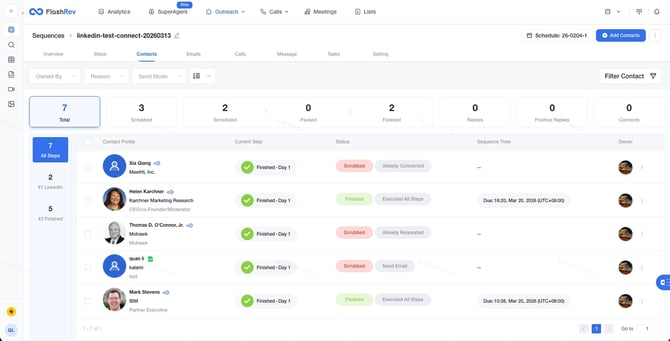
LinkedIn automation is one of the most frequently used features in outreach workflows. However, some users previously experienced occasional instability during execution, including interruptions in connection requests or follow-up steps.
To address these issues and ensure a smoother experience, we have upgraded the LinkedIn automation engine to Version 2.0, with a major focus on reliability and execution consistency.
-
Rebuilt automation execution engine
-
The underlying workflow engine for LinkedIn actions has been refactored to ensure more consistent task execution across sequences.
-
-
Improved task stability
-
Connection requests and automated follow-ups now run with significantly improved stability, reducing the risk of interruptions or failed steps.
-
With LinkedIn Automation V2.0, your outreach sequences run more reliably, allowing you to scale LinkedIn prospecting with greater confidence and fewer manual interventions.