---
title: FlashRev Weekly Update (March 16-20, 2026)
description: "FlashRev Update: Capture LinkedIn leads with Social Signal Scout. Automate responses via AI Reply Agent, localize AI emails, and share Sequence replies."
---
[Skip to content](https://knowledge.flashintel.ai/en/knowledge/flashrev-weekly-update-march-16-20-2026#main-content)
English
Show submenu for translations
[](https://www.flashlabs.ai/)
Open main navigation
Close main navigation
- English
Show submenu for translations
How can we help you?
- There are no suggestions because the search field is empty.
1. [Knowledge Base](https://knowledge.flashintel.ai/en/knowledge?hsLang=en)
2. [Release Notes](https://knowledge.flashintel.ai/en/knowledge/release-notes?hsLang=en)
3. [March 2026](https://knowledge.flashintel.ai/en/knowledge/release-notes?hsLang=en#march-2026)
# FlashRev Weekly Update (March 16-20, 2026)
**1. SuperAgent Social Signal Scout: AI-Powered Lead Generation**
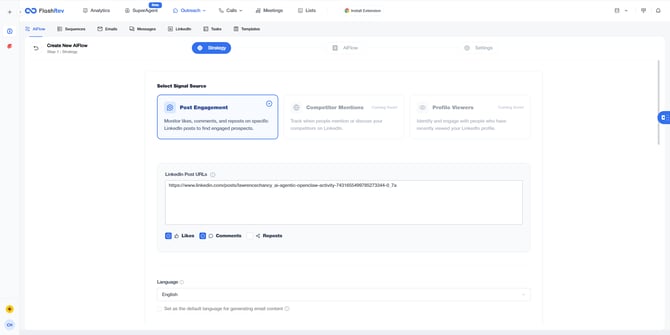
##Core Concept: Signal-Based Prospecting
**Social Signal Scout** captures high-intent leads via real-time LinkedIn social signals. It focuses on engagement trends rather than static searches, ensuring maximum relevance.
##Signal Strategy: Target Post Engagement
- **Logic**: Mines engagement from specific high-traffic LinkedIn posts.
- **Configuration**: Supports multiple post URLs with filters for Likes, Comments, and Reposts.
- **Value**: Reaches users who have expressed explicit interest in specific industry topics.
##Smart LinkedIn Binding Logic
- **Non-Intrusive**: Analyze post engagement without needing to bind a personal account immediately.
- **On-Demand Binding**: Account binding is only triggered for high-depth data extraction strategies.
- **Multi-Account Support**: Bind multiple LinkedIn accounts and switch sender identities across different campaigns.
##AI-Driven Pitch Strategy
- **One-Click Analysis**: AI extracts Value Props and Pain Points directly from a product URL.
- **Scenario Alignment**: Automatically tailors pitches to the social signal context, matching the prospect's social behavior.
**2. AI Reply Agent: "Autopilot" for AI Flow**
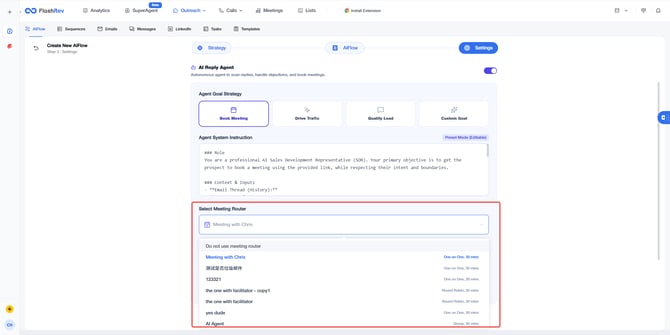
##Core Goal
Transform email sequences from static senders to intelligent closers. **AI Reply Agent** understands prospect intent like a senior sales rep, advancing conversions or handling opt-outs automatically.
##Feature Highlights
- **True "Intent-Aware" Response Logic**
- **Advancement Mode**: When the AI senses interest (e.g., asking about pricing, features, or positive feedback), it automatically generates a personalized response based on your goals.
- **Compliance Protection**: If a prospect asks to be removed or declines, the AI recognizes the intent, sends a polite confirmation, and stops the sequence to protect your sender reputation.
- **Seamless Meeting Router Integration**
- **Dynamic Linking**: In "Book Meeting" mode, the AI automatically utilizes your pre-configured Meeting Router links.
- **Frictionless Booking**: Guides prospects to view your real-time availability and book directly, drastically shortening the path from "Interested" to "Booked."
##Getting Started
Navigate to `AI FLOW Settings` -> `AI Reply Agent` and toggle the switch. We recommend starting with **Book Meeting** mode paired with your preferred **Meeting Router**.
**3. AI Flow: Localized Email Language Generation**
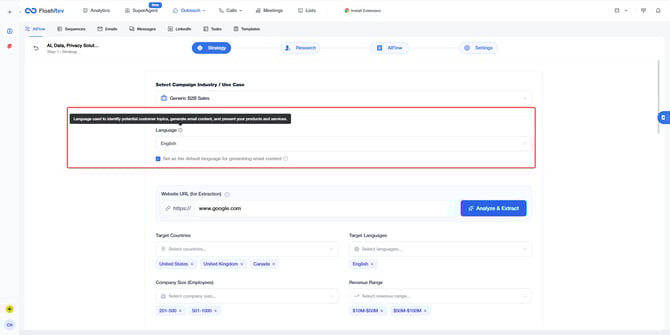
##Definition
A new **Language** configuration has been added to the **Strategy** step of AI Flow, giving users granular control over the language used in AI-generated marketing emails.
##Core Modes
- **Fixed Language**: Specify a single language (e.g., English). The AI will generate emails in this language regardless of the prospect's origin or native tongue.
- **Dynamic Location-Based Generation**: The AI automatically selects the language based on the prospect’s region or country.
- **US Prospect** -> Generates English emails.
- **Japan Prospect** -> Generates Japanese emails.
##Core Value
- **Localized Engagement**: Increases open and reply rates by communicating in the prospect's native language for specific markets.
- **Global Scalability**: Eliminates the need for multiple AI Flows for different regions; one flow now caters to the global market seamlessly.
**4. Shared Reply Permissions (Allow other users to reply)**
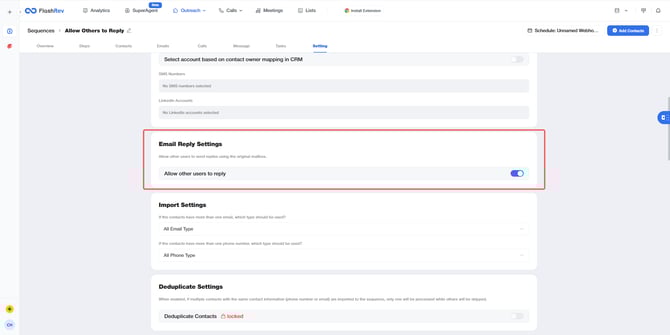
##Problem Solved
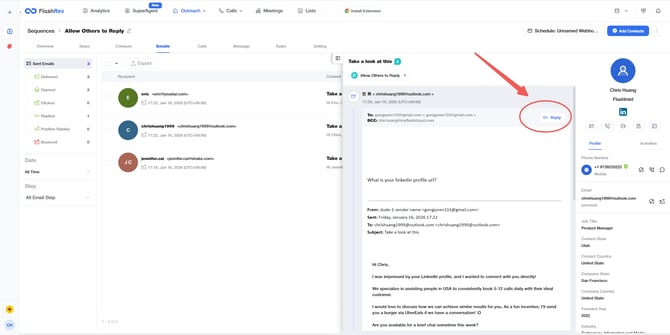
Previously, while users could utilize a shared mailbox pool in a Sequence, only the actual "mailbox owner" was authorized to reply to incoming emails. This created significant bottlenecks when a Sequence manager did not own the sending mailbox.
##Feature Update
A new configuration **"Allow other users to reply"** is now available in Sequence settings:
- **Permission Breakthrough**: This option removes the restriction tied to individual mailbox ownership.
- **Unified Follow-up**: Once enabled, any user with access to the Sequence can reply to all incoming emails within the `Sequence - Emails` tab, regardless of mailbox ownership.
##Core Value
- **Seamless Collaboration**: Ensures leads generated by AI Flows or shared Sequences can be handled by any team member immediately.
- **Faster Response Times**: Eliminates the need for account swapping or waiting for specific owners to act.
**5. Dialer Global Billing System Overhaul**
##Background
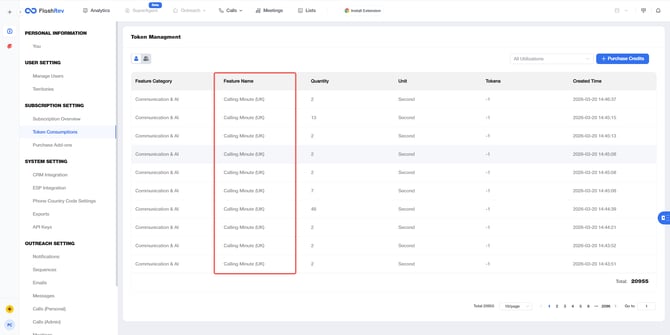
Previously, the Dialer billing logic was oversimplified, distinguishing only between Japan (+81) and Non-Japan (+1) for Feature ID deductions. As our business expands into Europe and other global markets, a binary model is no longer sufficient.
- **Goal**: Establish a precise billing matrix covering major global regions and optimize the settlement mechanism for call duration.
##Key Changes & Features
**#1 Multi-Country Token Deduction Matrix**
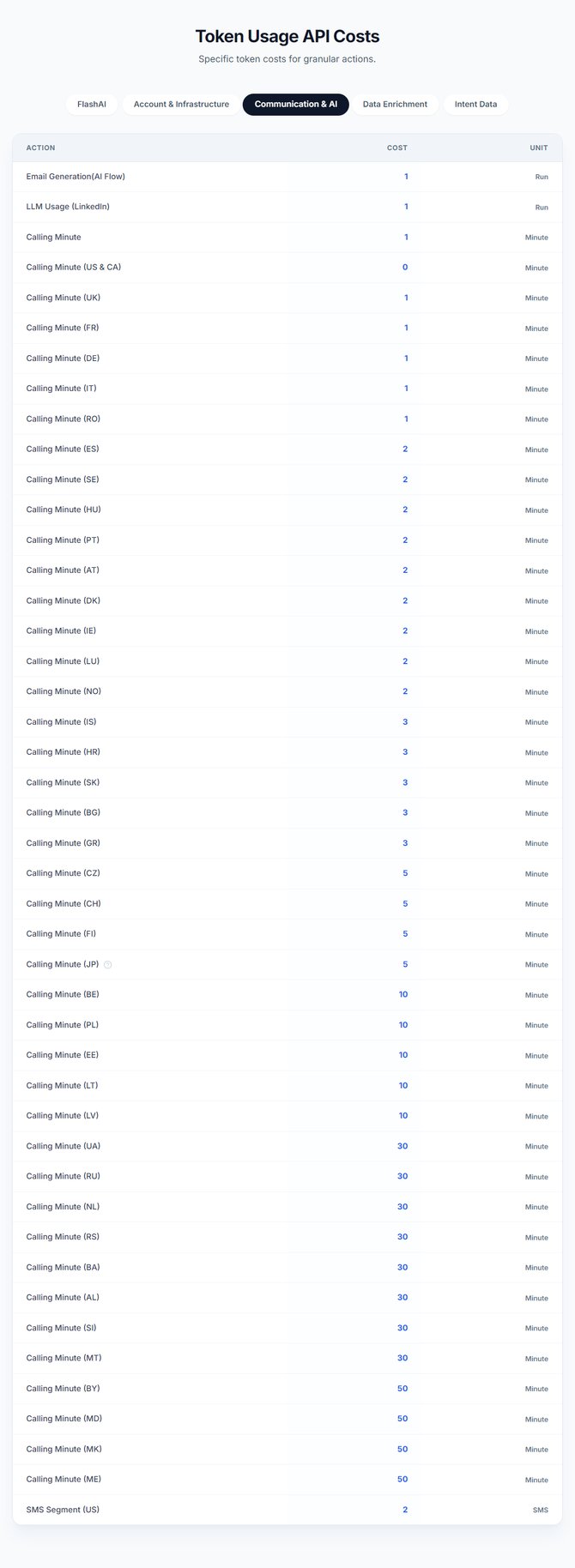
The system now identifies the country of the "To Number" via its prefix and deducts the balance from the corresponding `calling_minutes_{country}` Feature ID. If a prefix is not specifically listed, it falls back to `calling_minutes_general`:
- **North America**: US / Canada (+1) -> `calling_minutes_us`
- **Europe**: Covers 30+ countries including UK (+44), France (+33), Germany (+49), Italy (+39), Spain (+34), etc.
- **Asia**: Japan (+81) -> `calling_minutes_jp`
- **Global General**: Any other country code -> `calling_minutes_general`
**#2 Optimized Token Settlement Mechanism**
To align with global telecommunication standards, we have adjusted how call duration is converted into Token consumption:
- **Minimum Charge**: Any connected call lasting less than 1 minute will be billed as **1 full minute**.
- **Cumulative Billing**: Calls exceeding 1 minute will be billed based on total seconds (e.g., a 66-second call will be charged for 1.1 minutes worth of Tokens).
- **Example Comparison**:
- **Old Logic**: A 6-second call to the US consumed `(6/60) * 1 = 0.1 Token`.
- **New Logic**: A 6-second call to the US consumes `1 * 1 = 1.0 Token` (rounded up to 1 minute).
##Core Value
- **Precise Cost Control**: Enables granular pricing strategies for different countries, supporting complex international operations.
- **Billing Standardization**: Aligns with industry-standard telecommunication billing practices, improving financial auditing accuracy.
**6. LinkedIn Login Enhancement: Integrated Virtual Keyboard**
##Problem Solved
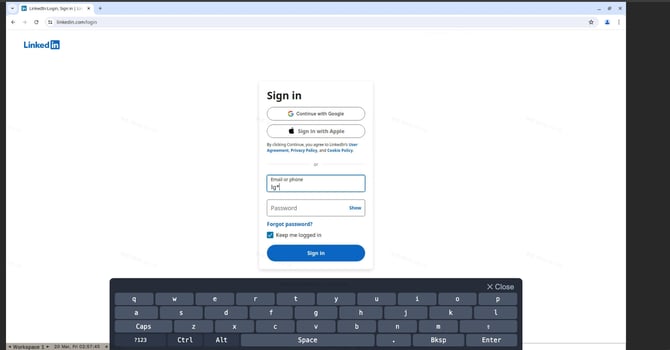
Executing LinkedIn automations requires a successful login via our remote browser. However, users often face input lag, character mapping errors, or special symbol issues when using physical keyboards in a remote environment.
##Feature Update
A comprehensive **Virtual Keyboard** is now embedded directly into the LinkedIn login interface:
- **Full Character Matrix**: Supports all alphanumeric characters and special symbols via mouse-click input, bypassing local driver conflicts.
- **UI Guidance**: The keyboard automatically toggles when the login fields are focused, providing a reliable alternative to physical typing.
##Core Value
- **Higher Reliability**: Ensures that the "Login" stage—the gateway to all LinkedIn automations—is no longer a bottleneck due to hardware or regional keyboard layout issues.
- **Secure Input**: Provides a controlled input environment for sensitive credentials.
- [Get Started](https://knowledge.flashintel.ai/en/knowledge/get-started?hsLang=en#main-content)
- [GTM - Go-to-Market Basics](https://knowledge.flashintel.ai/en/knowledge/get-started?hsLang=en#gtm-go-to-market-basics)
- [Discover Tab](https://knowledge.flashintel.ai/en/knowledge/discover-tab?hsLang=en#main-content)
- [People Search](https://knowledge.flashintel.ai/en/knowledge/discover-tab?hsLang=en#people-search)
- [Company Search](https://knowledge.flashintel.ai/en/knowledge/discover-tab?hsLang=en#company-search)
- [In-Market-Timing Engine](https://knowledge.flashintel.ai/en/knowledge/discover-tab?hsLang=en#in-market-timing-engine)
- [Data Governance](https://knowledge.flashintel.ai/en/knowledge/discover-tab?hsLang=en#data-governance)
- [Engage Tab](https://knowledge.flashintel.ai/en/knowledge/engage-tab?hsLang=en#main-content)
- [Deliverability Strategies](https://knowledge.flashintel.ai/en/knowledge/engage-tab?hsLang=en#deliverability-strategies)
- [Parallel-Dialer](https://knowledge.flashintel.ai/en/knowledge/engage-tab?hsLang=en#parallel-dialer)
- [Sequences](https://knowledge.flashintel.ai/en/knowledge/engage-tab?hsLang=en#sequences)
- [Connection Guide](https://knowledge.flashintel.ai/en/knowledge/engage-tab?hsLang=en#connection-guide)
- [Meetings](https://knowledge.flashintel.ai/en/knowledge/engage-tab?hsLang=en#meetings)
- [LinkedIn Automation](https://knowledge.flashintel.ai/en/knowledge/engage-tab?hsLang=en#linkedin-automation)
- [List Tab](https://knowledge.flashintel.ai/en/knowledge/list-tab?hsLang=en#main-content)
- [List Management](https://knowledge.flashintel.ai/en/knowledge/list-tab?hsLang=en#list-management)
- [CSV Enrichment](https://knowledge.flashintel.ai/en/knowledge/list-tab?hsLang=en#csv-enrichment)
- [CRM List](https://knowledge.flashintel.ai/en/knowledge/list-tab?hsLang=en#crm-list)
- [Integrations](https://knowledge.flashintel.ai/en/knowledge/integrations?hsLang=en#main-content)
- [Zapier](https://knowledge.flashintel.ai/en/knowledge/integrations?hsLang=en#zapier)
- [HubSpot](https://knowledge.flashintel.ai/en/knowledge/integrations?hsLang=en#hubspot)
- [App and Extension](https://knowledge.flashintel.ai/en/knowledge/app-and-extension?hsLang=en#main-content)
- [Chrome Extension](https://knowledge.flashintel.ai/en/knowledge/app-and-extension?hsLang=en#chrome-extension)
- [Strategies](https://knowledge.flashintel.ai/en/knowledge/strategies?hsLang=en#main-content)
- [Account-based Marketing](https://knowledge.flashintel.ai/en/knowledge/strategies?hsLang=en#account-based-marketing)
- [Tutorial & Walkthrough Videos](https://knowledge.flashintel.ai/en/knowledge/tutorial-walkthrough-videos?hsLang=en#main-content)
- [Onboarding](https://knowledge.flashintel.ai/en/knowledge/tutorial-walkthrough-videos?hsLang=en#onboarding)
- [Release Notes](https://knowledge.flashintel.ai/en/knowledge/release-notes?hsLang=en#main-content)
- [August 2023](https://knowledge.flashintel.ai/en/knowledge/release-notes?hsLang=en#august-2023)
- [September 2023](https://knowledge.flashintel.ai/en/knowledge/release-notes?hsLang=en#september-2023)
- [October 2023](https://knowledge.flashintel.ai/en/knowledge/release-notes?hsLang=en#october-2023)
- [November 2023](https://knowledge.flashintel.ai/en/knowledge/release-notes?hsLang=en#november-2023)
- [December 2023](https://knowledge.flashintel.ai/en/knowledge/release-notes?hsLang=en#december-2023)
- [January 2024](https://knowledge.flashintel.ai/en/knowledge/release-notes?hsLang=en#january-2024)
- [February 2024](https://knowledge.flashintel.ai/en/knowledge/release-notes?hsLang=en#february-2024)
- [March 2024](https://knowledge.flashintel.ai/en/knowledge/release-notes?hsLang=en#march-2024)
- [April 2024](https://knowledge.flashintel.ai/en/knowledge/release-notes?hsLang=en#april-2024)
- [May 2024](https://knowledge.flashintel.ai/en/knowledge/release-notes?hsLang=en#may-2024)
- [June 2024](https://knowledge.flashintel.ai/en/knowledge/release-notes?hsLang=en#june-2024)
- [July 2024](https://knowledge.flashintel.ai/en/knowledge/release-notes?hsLang=en#july-2024)
- [August 2024](https://knowledge.flashintel.ai/en/knowledge/release-notes?hsLang=en#august-2024)
- [September 2024](https://knowledge.flashintel.ai/en/knowledge/release-notes?hsLang=en#september-2024)
- [October 2024](https://knowledge.flashintel.ai/en/knowledge/release-notes?hsLang=en#october-2024)
- [November 2024](https://knowledge.flashintel.ai/en/knowledge/release-notes?hsLang=en#november-2024)
- [December 2024](https://knowledge.flashintel.ai/en/knowledge/release-notes?hsLang=en#december-2024)
- [January 2025](https://knowledge.flashintel.ai/en/knowledge/release-notes?hsLang=en#january-2025)
- [February 2025](https://knowledge.flashintel.ai/en/knowledge/release-notes?hsLang=en#february-2025)
- [March 2025](https://knowledge.flashintel.ai/en/knowledge/release-notes?hsLang=en#march-2025)
- [April 2025](https://knowledge.flashintel.ai/en/knowledge/release-notes?hsLang=en#april-2025)
- [May 2025](https://knowledge.flashintel.ai/en/knowledge/release-notes?hsLang=en#may-2025)
- [June 2025](https://knowledge.flashintel.ai/en/knowledge/release-notes?hsLang=en#june-2025)
- [July 2025](https://knowledge.flashintel.ai/en/knowledge/release-notes?hsLang=en#july-2025)
- [August 2025](https://knowledge.flashintel.ai/en/knowledge/release-notes?hsLang=en#august-2025)
- [September 2025](https://knowledge.flashintel.ai/en/knowledge/release-notes?hsLang=en#september-2025)
- [October 2025](https://knowledge.flashintel.ai/en/knowledge/release-notes?hsLang=en#october-2025)
- [November 2025](https://knowledge.flashintel.ai/en/knowledge/release-notes?hsLang=en#november-2025)
- [December 2025](https://knowledge.flashintel.ai/en/knowledge/release-notes?hsLang=en#december-2025)
- [January 2026](https://knowledge.flashintel.ai/en/knowledge/release-notes?hsLang=en#january-2026)
- [February 2026](https://knowledge.flashintel.ai/en/knowledge/release-notes?hsLang=en#february-2026)
- [March 2026](https://knowledge.flashintel.ai/en/knowledge/release-notes?hsLang=en#march-2026)
- [Contact us](https://knowledge.flashintel.ai/en/knowledge/contact-us?hsLang=en)
[](https://knowledge.flashintel.ai/?hsLang=en)
FlashLabs Knowledge Base
© 2026 FlashLabs AI