---
title: FlashRev Weekly Update (January 19-24, 2026)
description: "FlashRev Update: Role-based Mailbox access is live! Secure your outreach resources. Plus, manage Meeting Routers directly from your profile sidebar."
---
[Skip to content](https://knowledge.flashintel.ai/en/knowledge/flashrev-weekly-update-january-19-24-2026#main-content)
English
Show submenu for translations
[](https://www.flashlabs.ai/)
Open main navigation
Close main navigation
- English
Show submenu for translations
How can we help you?
- There are no suggestions because the search field is empty.
1. [Knowledge Base](https://knowledge.flashintel.ai/en/knowledge?hsLang=en)
2. [Release Notes](https://knowledge.flashintel.ai/en/knowledge/release-notes?hsLang=en)
3. [January 2026](https://knowledge.flashintel.ai/en/knowledge/release-notes?hsLang=en#january-2026)
# FlashRev Weekly Update (January 19-24, 2026)
**1. Mailbox Role-Based Access Control Enhancement**
**Background**
As enterprise sales teams scale, administrators require more granular control over how shared resources—particularly outbound mailboxes—are used. Under the previous model, **Users** were able to access and send emails from **any mailbox connected at the company level**. In large organizations, this often led to mailbox misuse, blurred sales ownership, and elevated compliance risk due to frequent cross-account activity.
To address these challenges, we re-architected mailbox access permissions to be **strictly bound to user roles**, ensuring clearer ownership, stronger isolation, and enterprise-grade governance.
**Before vs. After Comparison**
| Dimension | Before | After |
| --- | --- | --- |
| Users | Could view and use all company-wide connected mailboxes. | Access restricted to self-owned mailboxes only (Mailbox Owner = Self). |
| Admin / Owner Roles | Full permissions to manage and use all company mailboxes. | Unchanged: Maintains a global view with the highest level of control and oversight. |
| Resource Isolation | All mailbox resources were shared globally, with low isolation and higher misuse risk. | Strong isolation model: Sales resources are precisely mapped to individuals, significantly reducing compliance and operational risk. |
**What Changed**
This update introduces backend-level permission filtering to ensure that **only eligible mailboxes are surfaced across all critical workflows**, including:
Sequence Automation
- **Configuration stage**: When selecting mailboxes in Sequence Settings, only personal mailboxes are displayed.
- **Management stage**: Manually assigning a sender mailbox to a specific prospect is restricted to user-owned mailboxes.
- **Preview stage**: Sender switching during step preview is limited to personal mailboxes only.
Email Communication
- **Unibox**: The selectable “From” identity is strictly controlled based on role and ownership.
- **Mailbox Operations**: During mailbox deletion, successor selection, and bulk update actions, mailbox options are filtered under the same permission rules.
Sales Execution Tools
- **One-off Emails**: Mailbox selection in the contact sidebar respects the updated access model.
- **AI Flow**: AI-driven workflows inherit the same role-based mailbox constraints when selecting sender pools.
**Core Value**
- **Compliance by Design** Enforces a clear “use what you own” principle, reducing the risk of cross-account behavior, mailbox linking, and deliverability penalties.
- **Stronger Data & Resource Isolation** Sales resources are cleanly segmented at the individual level, protecting private pipelines and minimizing customer impact caused by misconfiguration or human error.
- **Uncompromised Administrative Control** Admins and Owners retain full global control, ensuring that mailbox assets can be securely reclaimed and reassigned during offboarding or role transitions.
**2. User Profile Interaction Upgrade: Integrated Meeting Router Quick Management**
**Background**
To further improve team productivity and reduce operational friction, we’ve enhanced the **User Profile** panel in the global sidebar. By integrating **calendar connectivity** and **Meeting Router visibility**, users can now manage their personal scheduling workflows directly from the sidebar—without navigating through deep configuration menus.
This update significantly streamlines how users create, manage, and share meeting booking links.
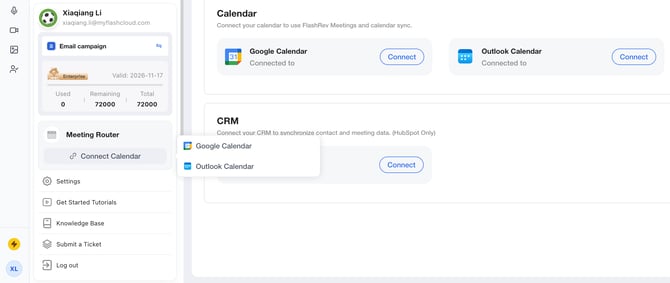
Calendar not connected
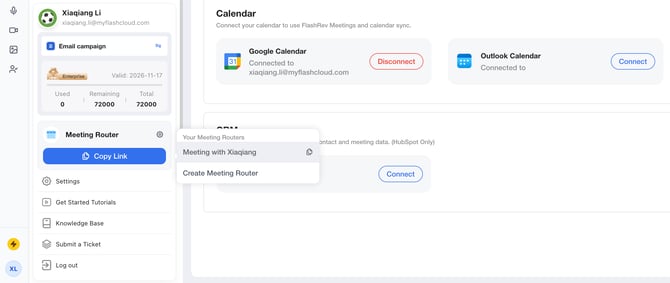
Calendar connected
**What’s New & Feature Overview**
Frontend: User Profile Layout Enhancement
- **Modular design**: Introduced a dedicated **Meeting Router** core component within the User Profile panel.
- **Status-aware behavior (Status Tags)**:
- **Not Connected (OFF)** Displays a **Connect Calendar** button. On hover, users can choose **Google Calendar** or **Outlook Calendar** to complete OAuth authorization.
- **Connected (ON)** Displays a **Settings** shortcut and dynamically adjusts available actions based on the user’s existing Meeting Routers.
- **Quick Action Buttons**:
- **Create Link** For users who have connected a calendar but have not yet created a Meeting Router, this button provides a one-click guided setup.
- **Copy Link** For users with existing Meeting Routers, hovering reveals a list sorted by **most recently created first**. Clicking any item instantly copies the booking link to the clipboard.
Backend: Automated Meeting Router Initialization
- **Trigger condition**: When a user successfully connects a third-party calendar (Google or Outlook) for the first time, the system automatically performs a pre-check.
- **Auto-creation logic**: If no **Personal** Meeting Router exists under the account, the system automatically creates a **1:1 Meeting Router** named **“Meet with {$firstName}”**.
- **Multilingual support**: Automatically generated router names adapt to the user’s language environment, including **English, Simplified Chinese, Traditional Chinese, Japanese, and French**, ensuring a consistent global experience.
**Core Value**
- **Faster workflows** Combines three high-frequency actions—**calendar status, router management, and link sharing**—into a single global panel, dramatically reducing user clicks.
- **Lower onboarding friction** With the “connect-and-initialize” logic, new users can instantly obtain a usable booking link, enabling rapid activation and faster time-to-value.
**3. Sequence Execution Ownership Update: Sequence Owner–Based Attribution**
**Background**
In certain enterprise permission models, **List management permissions are restricted to Admins**, while regular **Users (SDRs)** are only responsible for **creating Sequences**. In these setups, Admins centrally handle **adding contacts to Sequences**.
**Previous limitation:** The system defaulted the **Contact Owner / Admin** as the execution entity. As a result, when prospects replied via **SMS**, inbound messages were routed to the Admin’s inbox and randomly reassigned—preventing the actual Sequence creator from tracking and responding in real time.
Before vs. After Comparison
| Dimension | Before | After |
| --- | --- | --- |
| Sender / Execution Owner | Defaulted to the contact executor (Contact Owner / Admin) | Unified to Sequence Owner (the user who created the Sequence) |
| SMS Reply Ownership | Replies landed in the executor’s inbox and were randomly assigned, breaking follow-up continuity | Replies are routed directly to the Sequence Owner’s SMS Inbox, ensuring clear ownership and accountability |
| Collaboration Model | “Admin-operated actions” caused downstream follow-up disconnection | Seamless compatibility between Admin operations and User-led follow-ups |
**What Changed & How It Works**
This update introduces **no frontend UI changes**. All improvements are delivered through a backend execution-engine refactor:
- **Execution Ownership Transfer** For any Sequence step (Email, SMS, Call, etc.), the system now **forces the execution identity (Sender / Executor) to be the Sequence Owner**, regardless of who added the contact.
- **Inbound SMS Routing Optimization** SMS inbound routing logic has been updated to prioritize matching replies against the **Sequence Owner** recorded in the outbound execution history. This guarantees that conversation threads appear in the **correct user’s Unibox**, maintaining continuity.
**Core Value**
- **Closed-loop ownership** Enforces the principle of *“who builds the Sequence, owns the conversion”*, fully eliminating SMS reply misrouting.
- **Enterprise-ready collaboration** Enables strict List access control at the Admin level while preserving **clear, vertical lead follow-up** by individual sales users—significantly improving operational efficiency.
- [Get Started](https://knowledge.flashintel.ai/en/knowledge/get-started?hsLang=en#main-content)
- [GTM - Go-to-Market Basics](https://knowledge.flashintel.ai/en/knowledge/get-started?hsLang=en#gtm-go-to-market-basics)
- [Discover Tab](https://knowledge.flashintel.ai/en/knowledge/discover-tab?hsLang=en#main-content)
- [People Search](https://knowledge.flashintel.ai/en/knowledge/discover-tab?hsLang=en#people-search)
- [Company Search](https://knowledge.flashintel.ai/en/knowledge/discover-tab?hsLang=en#company-search)
- [In-Market-Timing Engine](https://knowledge.flashintel.ai/en/knowledge/discover-tab?hsLang=en#in-market-timing-engine)
- [Data Governance](https://knowledge.flashintel.ai/en/knowledge/discover-tab?hsLang=en#data-governance)
- [Engage Tab](https://knowledge.flashintel.ai/en/knowledge/engage-tab?hsLang=en#main-content)
- [Deliverability Strategies](https://knowledge.flashintel.ai/en/knowledge/engage-tab?hsLang=en#deliverability-strategies)
- [Parallel-Dialer](https://knowledge.flashintel.ai/en/knowledge/engage-tab?hsLang=en#parallel-dialer)
- [Sequences](https://knowledge.flashintel.ai/en/knowledge/engage-tab?hsLang=en#sequences)
- [Connection Guide](https://knowledge.flashintel.ai/en/knowledge/engage-tab?hsLang=en#connection-guide)
- [Meetings](https://knowledge.flashintel.ai/en/knowledge/engage-tab?hsLang=en#meetings)
- [LinkedIn Automation](https://knowledge.flashintel.ai/en/knowledge/engage-tab?hsLang=en#linkedin-automation)
- [List Tab](https://knowledge.flashintel.ai/en/knowledge/list-tab?hsLang=en#main-content)
- [List Management](https://knowledge.flashintel.ai/en/knowledge/list-tab?hsLang=en#list-management)
- [CSV Enrichment](https://knowledge.flashintel.ai/en/knowledge/list-tab?hsLang=en#csv-enrichment)
- [CRM List](https://knowledge.flashintel.ai/en/knowledge/list-tab?hsLang=en#crm-list)
- [Integrations](https://knowledge.flashintel.ai/en/knowledge/integrations?hsLang=en#main-content)
- [Zapier](https://knowledge.flashintel.ai/en/knowledge/integrations?hsLang=en#zapier)
- [HubSpot](https://knowledge.flashintel.ai/en/knowledge/integrations?hsLang=en#hubspot)
- [App and Extension](https://knowledge.flashintel.ai/en/knowledge/app-and-extension?hsLang=en#main-content)
- [Chrome Extension](https://knowledge.flashintel.ai/en/knowledge/app-and-extension?hsLang=en#chrome-extension)
- [Strategies](https://knowledge.flashintel.ai/en/knowledge/strategies?hsLang=en#main-content)
- [Account-based Marketing](https://knowledge.flashintel.ai/en/knowledge/strategies?hsLang=en#account-based-marketing)
- [Tutorial & Walkthrough Videos](https://knowledge.flashintel.ai/en/knowledge/tutorial-walkthrough-videos?hsLang=en#main-content)
- [Onboarding](https://knowledge.flashintel.ai/en/knowledge/tutorial-walkthrough-videos?hsLang=en#onboarding)
- [Release Notes](https://knowledge.flashintel.ai/en/knowledge/release-notes?hsLang=en#main-content)
- [August 2023](https://knowledge.flashintel.ai/en/knowledge/release-notes?hsLang=en#august-2023)
- [September 2023](https://knowledge.flashintel.ai/en/knowledge/release-notes?hsLang=en#september-2023)
- [October 2023](https://knowledge.flashintel.ai/en/knowledge/release-notes?hsLang=en#october-2023)
- [November 2023](https://knowledge.flashintel.ai/en/knowledge/release-notes?hsLang=en#november-2023)
- [December 2023](https://knowledge.flashintel.ai/en/knowledge/release-notes?hsLang=en#december-2023)
- [January 2024](https://knowledge.flashintel.ai/en/knowledge/release-notes?hsLang=en#january-2024)
- [February 2024](https://knowledge.flashintel.ai/en/knowledge/release-notes?hsLang=en#february-2024)
- [March 2024](https://knowledge.flashintel.ai/en/knowledge/release-notes?hsLang=en#march-2024)
- [April 2024](https://knowledge.flashintel.ai/en/knowledge/release-notes?hsLang=en#april-2024)
- [May 2024](https://knowledge.flashintel.ai/en/knowledge/release-notes?hsLang=en#may-2024)
- [June 2024](https://knowledge.flashintel.ai/en/knowledge/release-notes?hsLang=en#june-2024)
- [July 2024](https://knowledge.flashintel.ai/en/knowledge/release-notes?hsLang=en#july-2024)
- [August 2024](https://knowledge.flashintel.ai/en/knowledge/release-notes?hsLang=en#august-2024)
- [September 2024](https://knowledge.flashintel.ai/en/knowledge/release-notes?hsLang=en#september-2024)
- [October 2024](https://knowledge.flashintel.ai/en/knowledge/release-notes?hsLang=en#october-2024)
- [November 2024](https://knowledge.flashintel.ai/en/knowledge/release-notes?hsLang=en#november-2024)
- [December 2024](https://knowledge.flashintel.ai/en/knowledge/release-notes?hsLang=en#december-2024)
- [January 2025](https://knowledge.flashintel.ai/en/knowledge/release-notes?hsLang=en#january-2025)
- [February 2025](https://knowledge.flashintel.ai/en/knowledge/release-notes?hsLang=en#february-2025)
- [March 2025](https://knowledge.flashintel.ai/en/knowledge/release-notes?hsLang=en#march-2025)
- [April 2025](https://knowledge.flashintel.ai/en/knowledge/release-notes?hsLang=en#april-2025)
- [May 2025](https://knowledge.flashintel.ai/en/knowledge/release-notes?hsLang=en#may-2025)
- [June 2025](https://knowledge.flashintel.ai/en/knowledge/release-notes?hsLang=en#june-2025)
- [July 2025](https://knowledge.flashintel.ai/en/knowledge/release-notes?hsLang=en#july-2025)
- [August 2025](https://knowledge.flashintel.ai/en/knowledge/release-notes?hsLang=en#august-2025)
- [September 2025](https://knowledge.flashintel.ai/en/knowledge/release-notes?hsLang=en#september-2025)
- [October 2025](https://knowledge.flashintel.ai/en/knowledge/release-notes?hsLang=en#october-2025)
- [November 2025](https://knowledge.flashintel.ai/en/knowledge/release-notes?hsLang=en#november-2025)
- [December 2025](https://knowledge.flashintel.ai/en/knowledge/release-notes?hsLang=en#december-2025)
- [January 2026](https://knowledge.flashintel.ai/en/knowledge/release-notes?hsLang=en#january-2026)
- [February 2026](https://knowledge.flashintel.ai/en/knowledge/release-notes?hsLang=en#february-2026)
- [March 2026](https://knowledge.flashintel.ai/en/knowledge/release-notes?hsLang=en#march-2026)
- [Contact us](https://knowledge.flashintel.ai/en/knowledge/contact-us?hsLang=en)
[](https://knowledge.flashintel.ai/?hsLang=en)
FlashLabs Knowledge Base
© 2026 FlashLabs AI