
-
Support Hang-Up Sequence in parallel dialer & team dialer
Background
In high-velocity sales scenarios, manual follow-ups after dialing (e.g., sending thank-you emails or moving unanswered leads to SMS sequences) are time-consuming. Users need the system to automatically assign contacts to different follow-up paths based on call statuses.
Comparison
| Dimension | Before | After |
| Workflow | Manual follow-up assignment after call ends. | Fully Automated: Instant assignment to sequences based on preset logic. |
| Efficiency | Extra 1-2 mins per call for manual tagging and follow-up. | Zero Manual Effort: Follow-up tasks execute silently in the background. |
| Coverage | Higher risk of missing follow-ups for Busy or No Answer leads. | Full Status Coverage: Ensures precise next steps for every call outcome. |
Key Changes & Features
-
Configuration Entry:
-
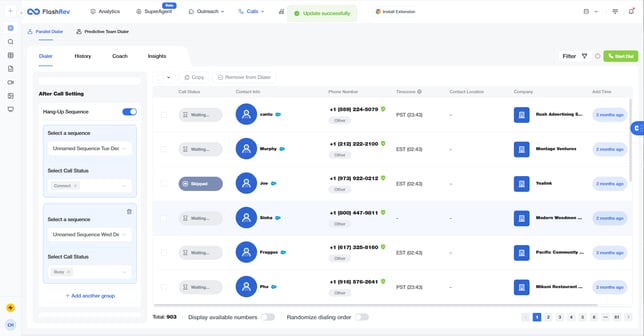
Parallel Dialer: Located in
After Call Settingson the left panel.
-
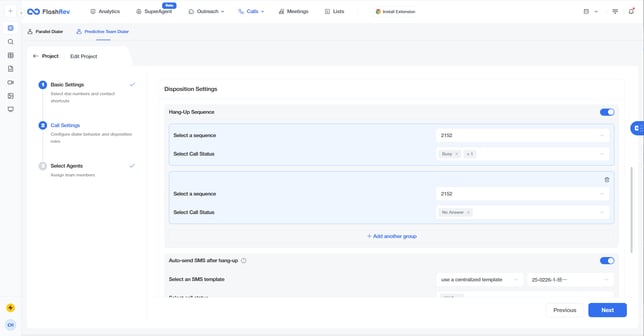
Predictive Team Dialer: Located in
Project Settings - Call Settingss
-
-
Core Logic:
-
Sequence Groups: Pairs a selected Sequence with a specific Call Status. Options include:
VM Drop,No Answer,Busy, andConnect. -
Scalability: Supports adding up to 4 different sequence groups.
-
State Persistence: Configuration is saved even if the main toggle is turned off and on again.
-
-
Tracking:
-
Frontend Display: Activity logs show
Add to Sequenceinformation as usual. -
Server Logs: Records the source as
{Hang-Up Sequence}, the specific{Call Status}, and the target sequence name for auditing.
-
Core Value
-
Double Sales Efficiency: Frees reps from tedious data entry, allowing them to focus on the next live conversation.
-
Granular Nurturing: Enhances conversion rates by applying targeted strategies (e.g., sending a deck after a connection vs. an SMS after a busy signal).
-
Standardized Process: Enables management to unify post-call workflows across the team.