
SuperAgent
1. Slide Agent: Version History and Rollback Features
Dual-Mode Editing
🎨 Manual Edit Mode — Pixel-Level Fine-Tuning
-
Feature Description: Enter the canvas directly to adjust slides just like using professional design software.
-
Version Creation Logic: The system includes an internal change counter. When you make modifications in manual mode (e.g., editing text, moving elements, changing colors), a persistent new version is generated only when you click the "Save" button and the system detects the change counter is greater than zero. Note: If you enter edit mode but click save without making changes, or directly click "Discard," no new version will be produced.
🤖 Agent Interactive Edit (Agent Edit) — Conversational Modifications
-
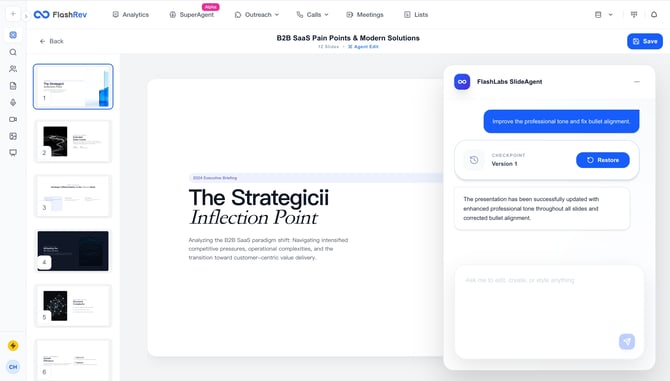
Feature Description: Use commands to have the AI make changes for you.
-
When a New Version is Created:Automatic Generation: Whenever the AI completes a modification command (e.g., "Set background to blue") and successfully updates the canvas, the system automatically creates a version snapshot for that change. This mechanism ensures that even if the AI's modification does not meet expectations, you can rollback with one click.
Comprehensive Version Control
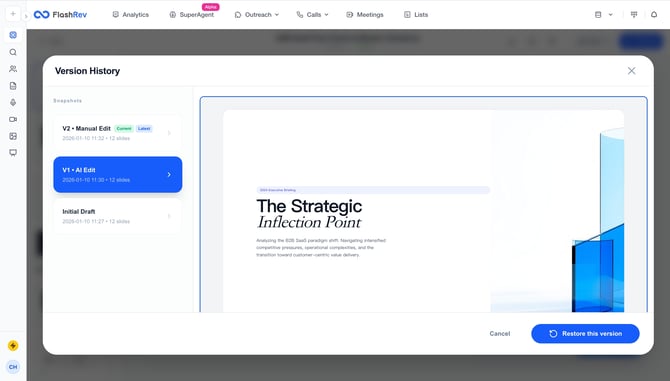
To make the creation process transparent and traceable, we provide detailed parameter annotations in the version history.
📌 Version Types (Version Modes) In the version list, each version indicates its source of origin:
-
Initial: The base version of the slides generated for the first time in this Thread.
-
Manual: A version produced after the user manually modifies in Manual Edit mode and clicks Save.
-
Agent: A version automatically generated by the AI based on the user's conversational commands.
📋 Core Version Parameters Each version snapshot contains the following details to help you identify specific versions:
-
Version Number: The version ID (e.g., V1, V2, V3...), incrementing in the order of generation.
-
Timestamp: Creation time accurate to the minute, allowing you to retrieve content by a specific time point.
-
Author: The name of the operator, clarifying who made the changes in team collaboration scenarios.
-
Status Labels:
-
Current: The version currently displayed and being edited on the canvas.
-
Latest: The most recent version record for this Deck (this may differ from the "Current" version if you are previewing an older version).
-
Others
2. Support for Receiving & Downloading Message Attachments
Attachment Recognition & Automatic Parsing
-
Scenario: When a customer sends a message containing images, scanned documents, or product manuals to your TFN (Toll-Free Number), the system automatically captures this content.
-
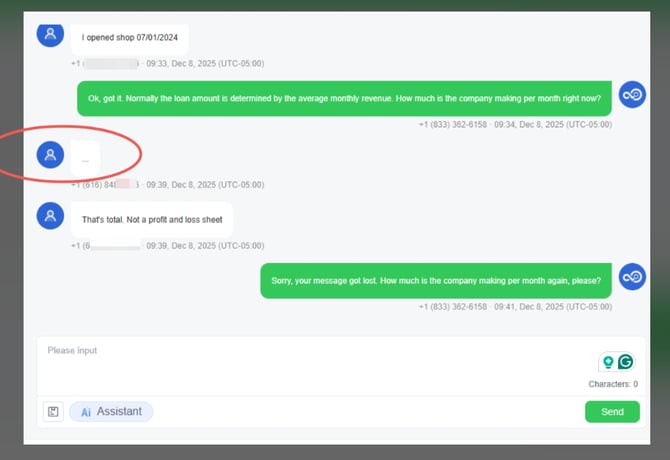
Display Optimization: Resolves the previous issue where unsupported content appeared merely as "...", now providing a clear indication that the message contains attachments.
Batch Attachment Download (MMS Download)
-
How to Use:
-
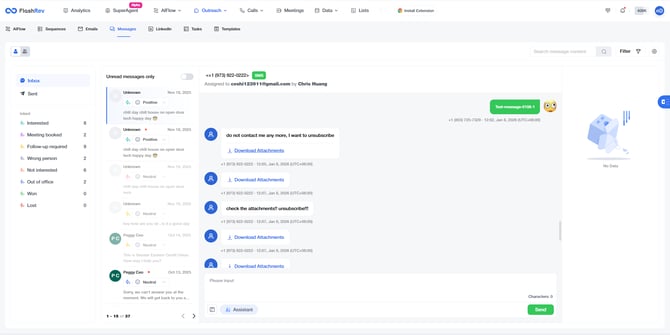
In the message history, if a specific message contains attachments, a blue text button labeled Download Attachments will appear below it.
-
Clicking this button triggers the system to automatically package all received attachments from that message.
-
The system generates a .zip archive and automatically initiates a browser download. Simply unzip the file to view all contents.
-
-
Core Value: Provides full support for file types including images (JPG/PNG), PDF documents, and VCard electronic business cards.
3. Optimized Meeting Link Recognition in Calendar
Optimization: For Outlook Calendar, the FlashRev platform previously failed to detect meeting links if they appeared in the "Location" or "Description" fields, which prevented the meeting recording bot from triggering and joining automatically.
Before: Failed to recognize meeting URLs present in the "Location" and "Description" fields of Outlook calendar events.
After: Successfully recognizes meeting URLs present in the "Location" and "Description" fields of Outlook calendar events.