---
title: FlashRev New Weekly Update [22nd December 2025 - 27th December 2025]
description: "New Updates: Share SuperAgent tasks with full \"Replay\" playback URLs. Plus, SlideAgent now supports AI Chat editing for instant deck refinements."
---
[Skip to content](https://knowledge.flashintel.ai/en/knowledge/flashrev-new-weekly-update-22nd-december-2025-27th-december-2025#main-content)
English
Show submenu for translations
[](https://www.flashlabs.ai/)
Open main navigation
Close main navigation
- English
Show submenu for translations
How can we help you?
- There are no suggestions because the search field is empty.
1. [Knowledge Base](https://knowledge.flashintel.ai/en/knowledge?hsLang=en)
2. [Release Notes](https://knowledge.flashintel.ai/en/knowledge/release-notes?hsLang=en)
3. [December 2025](https://knowledge.flashintel.ai/en/knowledge/release-notes?hsLang=en#december-2025)
# FlashRev New Weekly Update \[22nd December 2025 - 27th December 2025\]
> **SuperAgent**
**1. SuperAgent Task Sharing & Full Replay — Share the Entire AI Creation Journey**
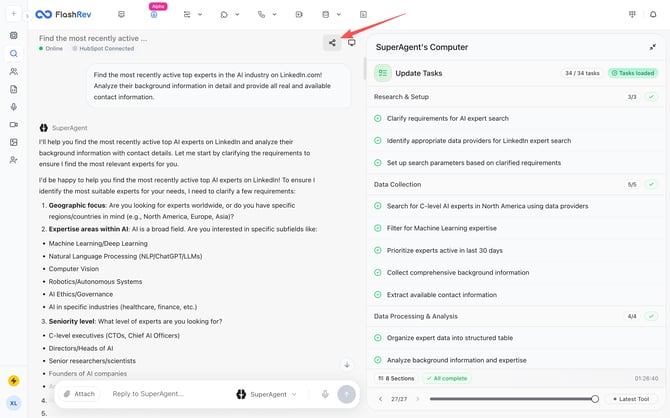
We’re excited to introduce a major new capability for **SuperAgent**: **Shareable Task URLs with full Replay playback**, allowing anyone to experience the *entire AI execution process -* from the very first prompt to the final output.
This update fundamentally changes how AI-generated work can be reviewed, shared, and showcased.
**🚀 What’s New**
SuperAgent Tasks—whether they generate **images**, **videos**, or other creative outputs - can now be shared via a **public Task URL**. Anyone with the link can open the task and **replay the full execution flow**, step by step.
This is not a static result view. It is a **complete, time-based reconstruction** of how the AI worked.
**🎬 Full Replay Playback (End-to-End)**
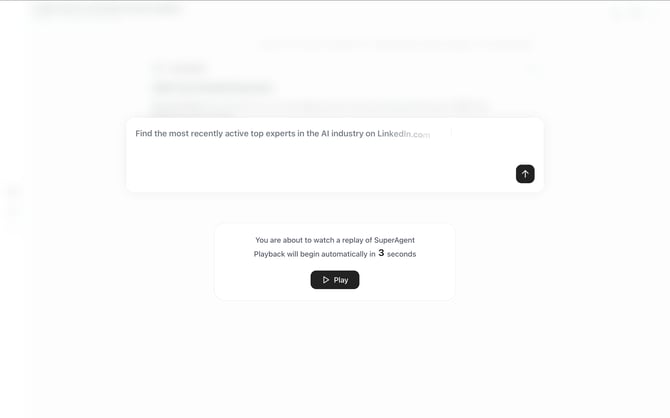
When opening a shared Task URL, viewers can watch a **Replay** of the entire SuperAgent session:
- ✍️ **User prompt replayed from the very beginning**, displayed with a typewriter-style animation
- 🤖 **Agent reasoning, tool execution, and intermediate steps** shown exactly as they occurred
- 🖼️ **Generated assets (images or videos)** revealed in sequence, matching the original workflow
- ⏱️ **Natural pacing and timing**, preserving how the task actually unfolded
It feels less like reading a log—and more like **watching a recorded AI collaboration session**.
**🌍 Public Sharing, Zero Friction**
- 🔗 One-click **Share Task URL**
- 🌐 **No login required** for viewers
- 👥 Ideal for sharing with teammates, clients, or on social platforms
- 📣 Perfect for demos, case studies, and AI capability showcases
Anyone with the link can instantly understand **what was asked, how SuperAgent thought, and how the final result was produced**.
**🧠 Why This Matters**
AI outputs alone rarely tell the full story. **The real value is in the process.**
With Task Replay:
- **Teams gain transparency** into how results were produced
- **Stakeholders build trust** by seeing reasoning and iteration, not just outcomes
- **Creators can showcase their workflows**, not just polished deliverables
- **Learning and onboarding accelerate**, as new users can replay real examples
This moves SuperAgent from a “black box generator” to a **fully observable AI execution environment**.
**💼 Real-World Use Cases**
- 🎨 **Creative reviews** — show clients how a concept evolved
- 📹 **Video generation demos** — replay the entire creation pipeline
- 🧑🏫 **Training & education** — teach best practices through real tasks
- 📢 **Marketing & social sharing** — publish AI workflows, not just results
- 🤝 **Internal collaboration** — align teams with shared visibility



**2. SlideAgent - Slide Editing via Chat**
Introduced a new **AI Chat–based editing workflow** inside SlideAgent, enabling users to refine and iterate on generated slides through natural language without leaving the presentation context.
**How It Works**
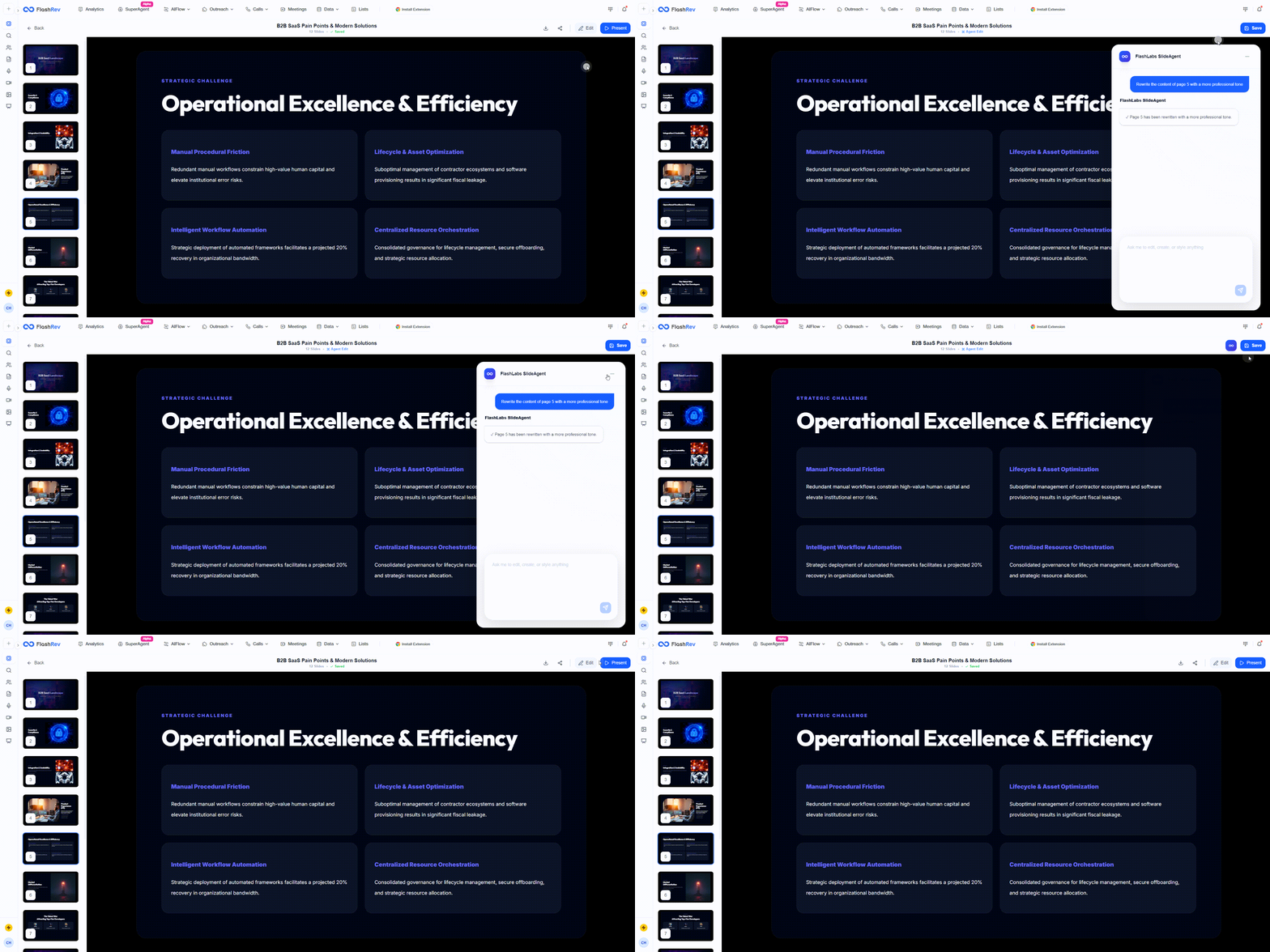
Once a slide deck is generated, users can click the **Edit** button in the top-right corner of the slide preview to open SlideAgent’s AI Chat panel.
From there, users can use natural language instructions to modify either specific slides or the entire deck, including:
- **Slide layout adjustments**
- **Visual design changes** (colors, typography, overall style)
- **Text content rewrites or refinements**
- **Illustration and visual content updates**
**3. SlideAgent - Full-Screen Prompt Input for Better Focus**
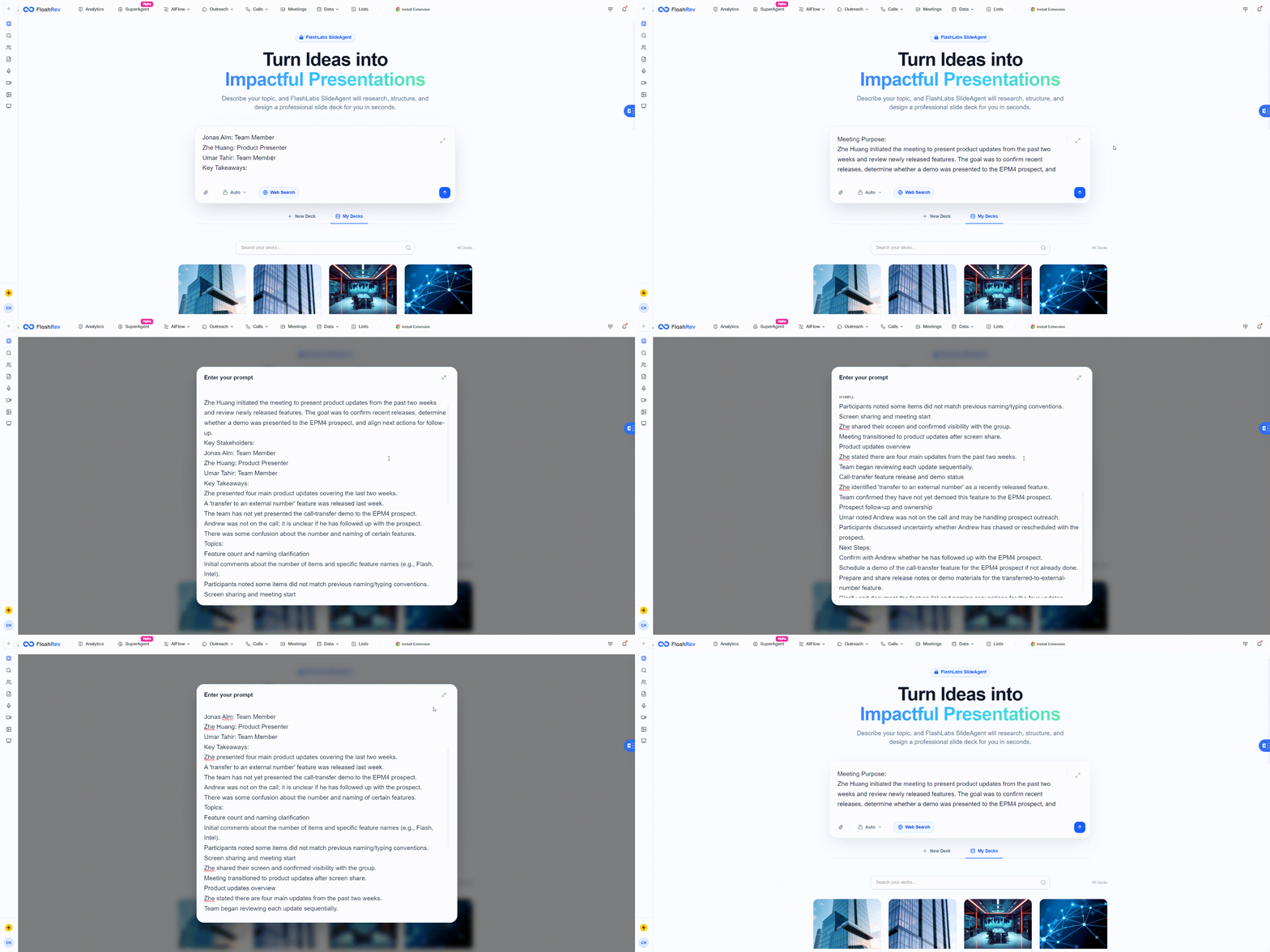
SlideAgent now supports full-screen expansion of the prompt input box.
- Users can expand the prompt editor to focus entirely on structuring ideas, outlines, or raw content without UI distractions.
- This is especially useful when pasting long meeting notes, structured agendas, or multi-section briefs.
- The expanded view improves readability and editing precision for complex prompts.
**4. Duplicate Existing Decks Directly from My Decks**
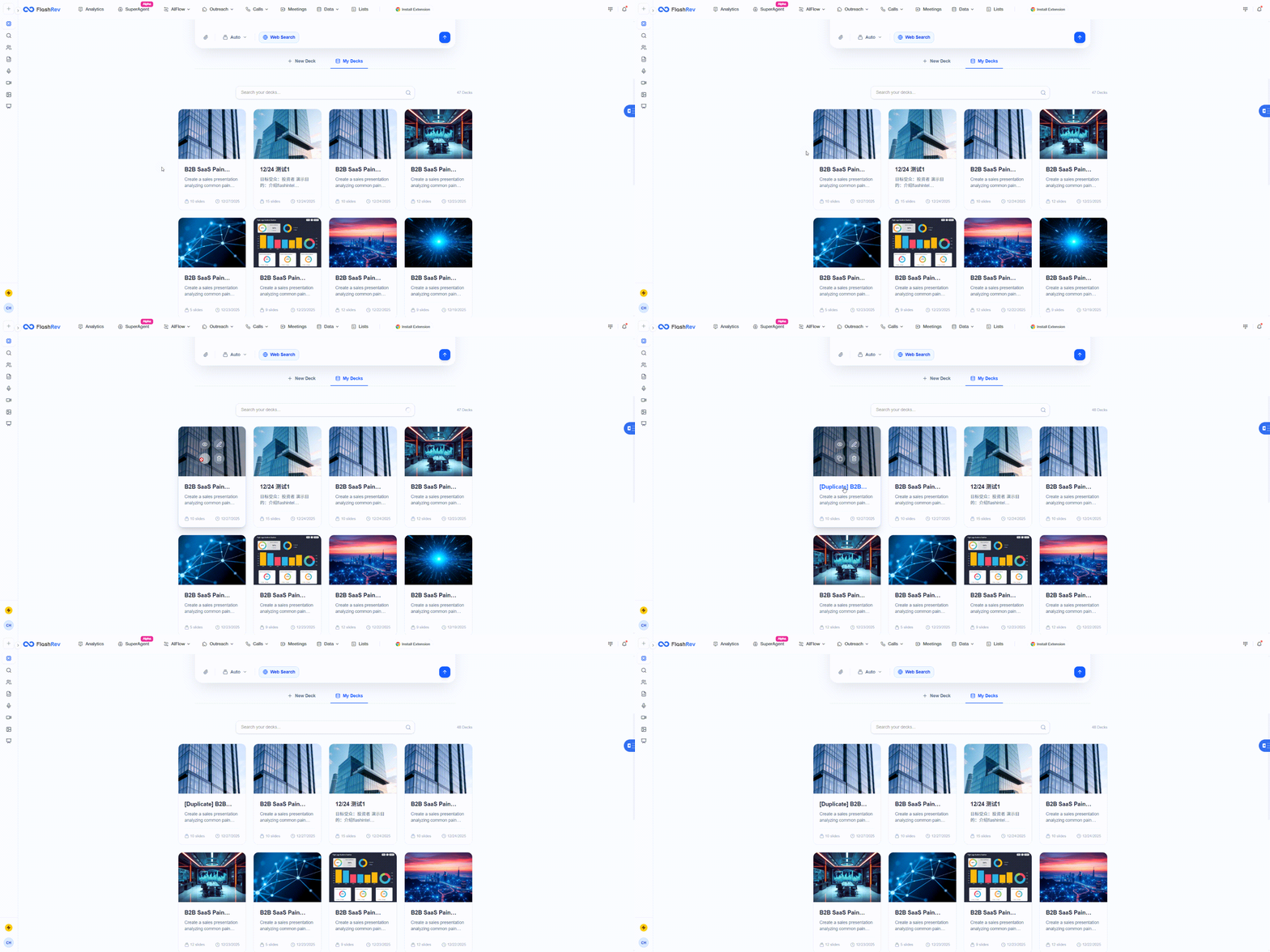
We’ve added the ability to copy previously generated slide decks directly from the My Decks panel.
- Any existing deck can now be duplicated with one click.
- The copied deck retains its structure, layout, and visual style.
- Users can immediately modify the duplicated version via Slide Agent without starting from scratch.
**5. Smarter Sharing: Slide Titles Now Visible in Shared Links**
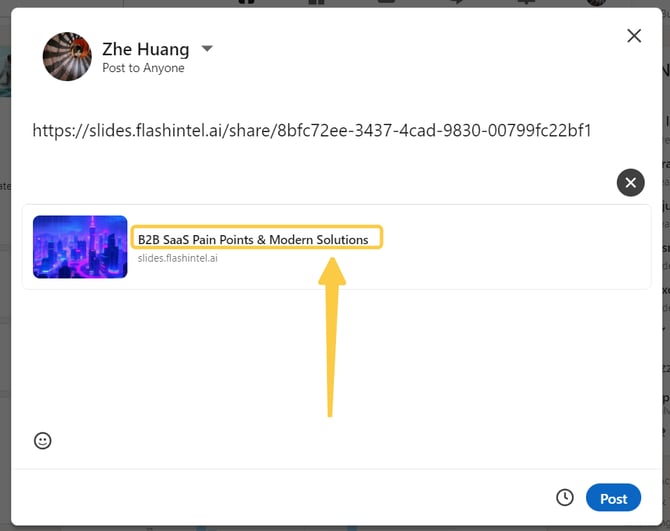
When sharing a Slide Agent deck via a public URL, the **slide title is now automatically included in the link preview**.
- Shared links clearly display the deck title instead of a generic URL.
- This applies across platforms such as LinkedIn and other social media platforms.
- Viewers immediately understand what the presentation is about before opening it.
**6. Improved Mobile Experience for Shared Slides**
We’ve optimized the **slide sharing page for mobile devices**.
- Layouts now adapt more gracefully to smaller screens.
- Text, images, and navigation controls are easier to read and interact with on mobile.
- Shared decks are presentation-ready whether viewed on desktop, tablet, or phone.
Presentations are often reviewed on the go. A strong mobile viewing experience ensures that shared decks remain professional and readable in real-world usage scenarios.
> **Others**
**7. Meeting Router Update: Form Field Labels Now Follow Page Language Settings**
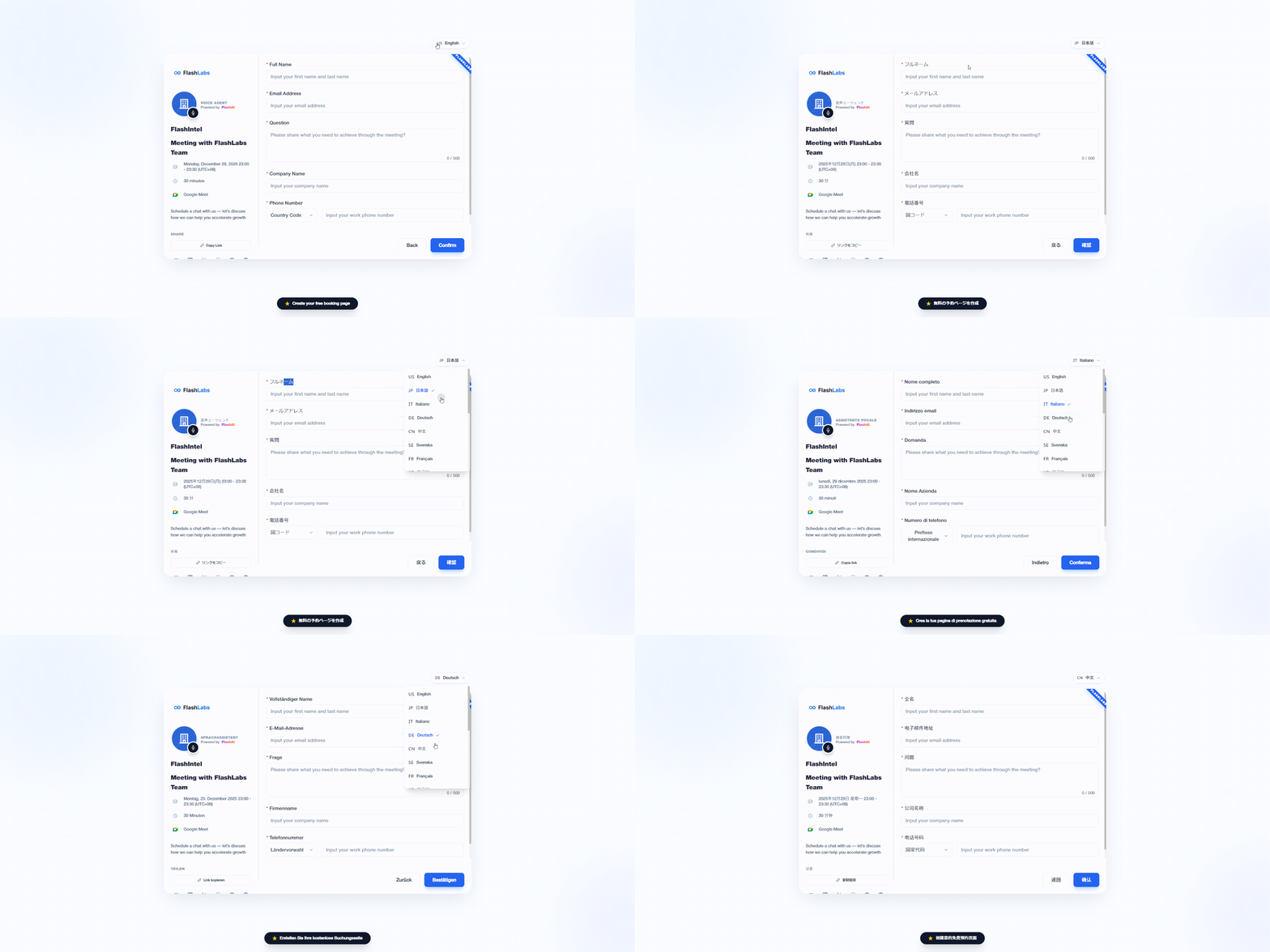
We’ve fixed an issue in Meeting Router where form field labels did not correctly update based on the selected page language.
**What was happening**
Previously, even when a booking page was configured to display in a specific language, some **form field labels** (such as name, email, company, or phone number) could still appear in a default language. This created an inconsistent experience for visitors, especially on international-facing booking pages.
**What’s fixed**
- Form field labels now **automatically adapt to the page’s active language setting**.
- The displayed language follows:
- The **visitor’s browser language** by default, and
- Any **manual language selection** made on the booking page.
- All required and optional fields remain fully aligned with the selected language throughout the booking flow.
- [Get Started](https://knowledge.flashintel.ai/en/knowledge/get-started?hsLang=en#main-content)
- [GTM - Go-to-Market Basics](https://knowledge.flashintel.ai/en/knowledge/get-started?hsLang=en#gtm-go-to-market-basics)
- [Discover Tab](https://knowledge.flashintel.ai/en/knowledge/discover-tab?hsLang=en#main-content)
- [People Search](https://knowledge.flashintel.ai/en/knowledge/discover-tab?hsLang=en#people-search)
- [Company Search](https://knowledge.flashintel.ai/en/knowledge/discover-tab?hsLang=en#company-search)
- [In-Market-Timing Engine](https://knowledge.flashintel.ai/en/knowledge/discover-tab?hsLang=en#in-market-timing-engine)
- [Data Governance](https://knowledge.flashintel.ai/en/knowledge/discover-tab?hsLang=en#data-governance)
- [Engage Tab](https://knowledge.flashintel.ai/en/knowledge/engage-tab?hsLang=en#main-content)
- [Deliverability Strategies](https://knowledge.flashintel.ai/en/knowledge/engage-tab?hsLang=en#deliverability-strategies)
- [Parallel-Dialer](https://knowledge.flashintel.ai/en/knowledge/engage-tab?hsLang=en#parallel-dialer)
- [Sequences](https://knowledge.flashintel.ai/en/knowledge/engage-tab?hsLang=en#sequences)
- [Connection Guide](https://knowledge.flashintel.ai/en/knowledge/engage-tab?hsLang=en#connection-guide)
- [Meetings](https://knowledge.flashintel.ai/en/knowledge/engage-tab?hsLang=en#meetings)
- [LinkedIn Automation](https://knowledge.flashintel.ai/en/knowledge/engage-tab?hsLang=en#linkedin-automation)
- [List Tab](https://knowledge.flashintel.ai/en/knowledge/list-tab?hsLang=en#main-content)
- [List Management](https://knowledge.flashintel.ai/en/knowledge/list-tab?hsLang=en#list-management)
- [CSV Enrichment](https://knowledge.flashintel.ai/en/knowledge/list-tab?hsLang=en#csv-enrichment)
- [CRM List](https://knowledge.flashintel.ai/en/knowledge/list-tab?hsLang=en#crm-list)
- [Integrations](https://knowledge.flashintel.ai/en/knowledge/integrations?hsLang=en#main-content)
- [Zapier](https://knowledge.flashintel.ai/en/knowledge/integrations?hsLang=en#zapier)
- [HubSpot](https://knowledge.flashintel.ai/en/knowledge/integrations?hsLang=en#hubspot)
- [App and Extension](https://knowledge.flashintel.ai/en/knowledge/app-and-extension?hsLang=en#main-content)
- [Chrome Extension](https://knowledge.flashintel.ai/en/knowledge/app-and-extension?hsLang=en#chrome-extension)
- [Strategies](https://knowledge.flashintel.ai/en/knowledge/strategies?hsLang=en#main-content)
- [Account-based Marketing](https://knowledge.flashintel.ai/en/knowledge/strategies?hsLang=en#account-based-marketing)
- [Tutorial & Walkthrough Videos](https://knowledge.flashintel.ai/en/knowledge/tutorial-walkthrough-videos?hsLang=en#main-content)
- [Onboarding](https://knowledge.flashintel.ai/en/knowledge/tutorial-walkthrough-videos?hsLang=en#onboarding)
- [Release Notes](https://knowledge.flashintel.ai/en/knowledge/release-notes?hsLang=en#main-content)
- [August 2023](https://knowledge.flashintel.ai/en/knowledge/release-notes?hsLang=en#august-2023)
- [September 2023](https://knowledge.flashintel.ai/en/knowledge/release-notes?hsLang=en#september-2023)
- [October 2023](https://knowledge.flashintel.ai/en/knowledge/release-notes?hsLang=en#october-2023)
- [November 2023](https://knowledge.flashintel.ai/en/knowledge/release-notes?hsLang=en#november-2023)
- [December 2023](https://knowledge.flashintel.ai/en/knowledge/release-notes?hsLang=en#december-2023)
- [January 2024](https://knowledge.flashintel.ai/en/knowledge/release-notes?hsLang=en#january-2024)
- [February 2024](https://knowledge.flashintel.ai/en/knowledge/release-notes?hsLang=en#february-2024)
- [March 2024](https://knowledge.flashintel.ai/en/knowledge/release-notes?hsLang=en#march-2024)
- [April 2024](https://knowledge.flashintel.ai/en/knowledge/release-notes?hsLang=en#april-2024)
- [May 2024](https://knowledge.flashintel.ai/en/knowledge/release-notes?hsLang=en#may-2024)
- [June 2024](https://knowledge.flashintel.ai/en/knowledge/release-notes?hsLang=en#june-2024)
- [July 2024](https://knowledge.flashintel.ai/en/knowledge/release-notes?hsLang=en#july-2024)
- [August 2024](https://knowledge.flashintel.ai/en/knowledge/release-notes?hsLang=en#august-2024)
- [September 2024](https://knowledge.flashintel.ai/en/knowledge/release-notes?hsLang=en#september-2024)
- [October 2024](https://knowledge.flashintel.ai/en/knowledge/release-notes?hsLang=en#october-2024)
- [November 2024](https://knowledge.flashintel.ai/en/knowledge/release-notes?hsLang=en#november-2024)
- [December 2024](https://knowledge.flashintel.ai/en/knowledge/release-notes?hsLang=en#december-2024)
- [January 2025](https://knowledge.flashintel.ai/en/knowledge/release-notes?hsLang=en#january-2025)
- [February 2025](https://knowledge.flashintel.ai/en/knowledge/release-notes?hsLang=en#february-2025)
- [March 2025](https://knowledge.flashintel.ai/en/knowledge/release-notes?hsLang=en#march-2025)
- [April 2025](https://knowledge.flashintel.ai/en/knowledge/release-notes?hsLang=en#april-2025)
- [May 2025](https://knowledge.flashintel.ai/en/knowledge/release-notes?hsLang=en#may-2025)
- [June 2025](https://knowledge.flashintel.ai/en/knowledge/release-notes?hsLang=en#june-2025)
- [July 2025](https://knowledge.flashintel.ai/en/knowledge/release-notes?hsLang=en#july-2025)
- [August 2025](https://knowledge.flashintel.ai/en/knowledge/release-notes?hsLang=en#august-2025)
- [September 2025](https://knowledge.flashintel.ai/en/knowledge/release-notes?hsLang=en#september-2025)
- [October 2025](https://knowledge.flashintel.ai/en/knowledge/release-notes?hsLang=en#october-2025)
- [November 2025](https://knowledge.flashintel.ai/en/knowledge/release-notes?hsLang=en#november-2025)
- [December 2025](https://knowledge.flashintel.ai/en/knowledge/release-notes?hsLang=en#december-2025)
- [January 2026](https://knowledge.flashintel.ai/en/knowledge/release-notes?hsLang=en#january-2026)
- [February 2026](https://knowledge.flashintel.ai/en/knowledge/release-notes?hsLang=en#february-2026)
- [March 2026](https://knowledge.flashintel.ai/en/knowledge/release-notes?hsLang=en#march-2026)
- [Contact us](https://knowledge.flashintel.ai/en/knowledge/contact-us?hsLang=en)
[](https://knowledge.flashintel.ai/?hsLang=en)
FlashLabs Knowledge Base
© 2026 FlashLabs AI
```json
{
"@context" : "https://schema.org",
"@type" : "VideoObject",
"contentUrl" : "https://22606445.fs1.hubspotusercontent-na1.net/hubfs/22606445/video_assets/203689296656/inherited/web_optimized.mp4",
"dateModified" : "2025-12-27T18:54:48.141Z",
"duration" : "PT19S",
"height" : 2340,
"name" : "Lark20251227-153023",
"thumbnailUrl" : "https://22606445.fs1.hubspotusercontent-na1.net/hubfs/22606445/Lark20251227-153023.mp4/medium.jpg?t=1766861688141",
"uploadDate" : "2025-12-27T18:54:33.933Z",
"width" : 1080
}
```