
FlashRev Discover
1.[SuperAgent Global Sidebar Update] A Fully Refreshed Layout for a More Efficient and Clear User Experience
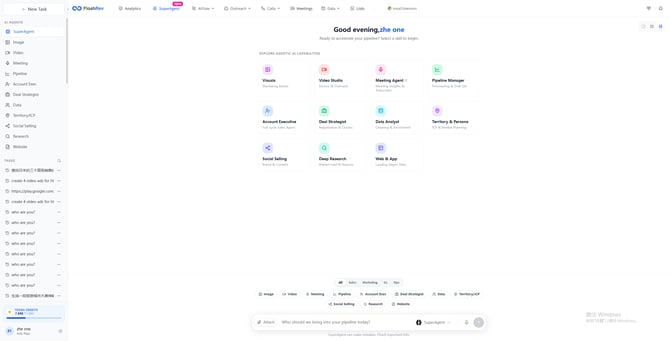
SuperAgent has rolled out a comprehensive upgrade to its global sidebar, introducing a revamped information architecture and a more intuitive interface layout. This update is designed to enhance task-flow clarity, improve the discoverability of key capabilities, and increase overall interaction efficiency—delivering a smoother workflow experience for professional users across diverse scenarios.
Highlights of the Update:
-
Clearer Global Navigation: The sidebar’s information architecture has been restructured, with core capabilities regrouped by scenario and functionality. This enables users to locate the features they need more quickly while reducing learning overhead.
-
More Intuitive Access to Key Capabilities: Frequently used entries—such as agents and model capabilities — are now placed front and center to enhance visibility and operational efficiency.
-
Refined Visual Design: The sidebar adopts a more modern and lightweight visual style, resulting in a cleaner, more focused, and more stable interface that reduces visual fatigue and boosts daily productivity.
.png?width=670&height=342&name=image%20(1).png)
.png?width=670&height=342&name=image%20(2).png)
.png?width=670&height=342&name=image%20(3).png)
.png?width=670&height=342&name=image%20(4).png)
.png?width=670&height=342&name=image%20(5).png)
.png?width=670&height=342&name=image%20(6).png)
.png?width=670&height=342&name=image%20(7).png)
.png?width=670&height=342&name=image%20(8).png)
.png?width=670&height=342&name=image%20(9).png)
.png?width=670&height=342&name=image%20(10).png)
.png?width=430&height=932&name=image%20(11).png)
.png?width=430&height=932&name=image%20(12).png)
.png?width=670&height=342&name=image%20(13).png)
.png?width=670&height=342&name=image%20(14).png)
.png?width=670&height=342&name=image%20(15).png)
.png?width=670&height=342&name=image%20(16).png)
-1.png?width=670&height=342&name=image%20(18)-1.png)
-1.png?width=670&height=342&name=image%20(19)-1.png)
-1.png?width=670&height=342&name=image%20(20)-1.png)
.png?width=670&height=342&name=image%20(21).png)
.png?width=670&height=342&name=image%20(22).png)
.png?width=670&height=342&name=image%20(23).png)
.png?width=670&height=342&name=image%20(24).png)
.png?width=670&height=342&name=image%20(25).png)
.png?width=670&height=342&name=image%20(26).png)
.png?width=670&height=333&name=image%20(27).png)
.png?width=670&height=342&name=image%20(28).png)
.png?width=670&height=342&name=image%20(29).png)
.png?width=430&height=932&name=image%20(30).png)
.png?width=430&height=932&name=image%20(31).png)
.png?width=430&height=932&name=image%20(32).png)
.png?width=430&height=932&name=image%20(33).png)
2.[Trigger Feature Enhancement] SuperAgent Upgrades Trigger Capabilities for More Powerful Automation
SuperAgent has introduced a comprehensive upgrade to its Trigger feature, bringing greater flexibility and control to automated task management. This enhancement makes scheduled triggers more intuitive to use while further strengthening their coordination with workflows, enabling smoother and more efficient automation across diverse scenarios.
Highlights of the Update:
-
Enhanced Scheduled Triggering: With a more stable scheduling mechanism, users can flexibly configure trigger rules to automatically initiate tasks at specified times—without any manual intervention.
-
Smarter Workflow Coordination: The optimized trigger logic can now function as a prerequisite within workflows, helping users prepare data, resources, or task context in advance. This significantly improves the coherence and success rate of end-to-end workflow execution.
-
More User-Friendly Configuration Experience: The interaction experience has been fully refined, offering clearer configuration paths and more intuitive trigger options, allowing users to get started quickly and manage automated tasks with ease.
-
Improved Stability & Reliability: The underlying trigger mechanism has been fully optimized to reduce delays and triggering errors, ensuring higher reliability for mission-critical business scenarios.
.png?width=670&height=333&name=image%20(34).png)
.png?width=670&height=333&name=image%20(35).png)
3.[SuperAgent Resource Link Migration] Unified Optimization of All External Websites, Images, and Video Links
SuperAgent has completed a full migration and optimization of all externally facing resource links. All LLM-related websites, images, videos, and other assets have been fully transitioned to the new official domain: -space.flashlabs.ai. This migration is designed to provide users with a more unified, stable, and efficient resource access experience, ensuring seamless integration across capability showcases and content distribution channels.
Highlights of the Update:
-
Unified Domain for a More Professional Identity: All previous LLM-related external links have been consolidated under the -space.flashlabs.ai domain, creating a more consistent brand identity, reducing fragmented redirects, and improving user trust and recognition.
-
Faster and More Reliable Resource Loading: Images, videos, documents, and other static assets under the new domain now benefit from full CDN acceleration and anti-leech protection. Global access speed is significantly improved, reducing loading failures and latency issues.
-
Greatly Enhanced Maintainability: With centralized domain management, all future model releases, feature updates, and case studies will default to storing related images and videos under -space.flashlabs.ai, making one-click updates and long-term maintenance far more efficient.
-
Seamless Transition with Zero User Impact: All historical conversations and shared links now support 301 permanent redirects. Users and external visitors do not need to modify anything—legacy links remain valid and automatically route to the new addresses.
.png?width=670&height=316&name=image%20(36).png)
.png?width=670&height=322&name=image%20(37).png)
FlashRev Outreach
1. Slide Agent Update - Shareable Preview Links & Task History
This week’s Slide Agent update introduces two usability improvements that make it easier to share your presentations and manage your past slide-generation tasks: Shareable Preview Links and Task History.
🔗 Shareable Preview Links
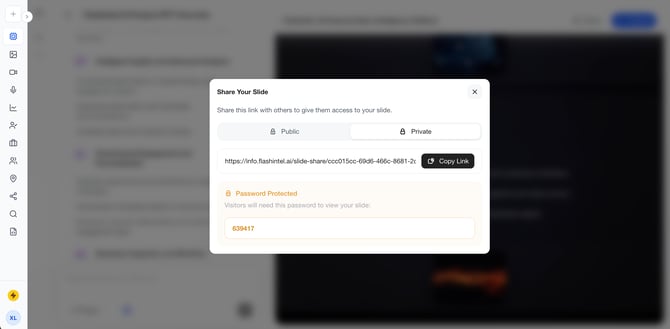
You can now share your presentation using a dedicated Share Your Slide URL, allowing teammates, clients, or external reviewers to easily access the deck without needing a FlashRev account.
Two access modes are supported:
-
Public Link
-
Anyone with the URL can open and view the presentation.
-
Ideal for quick previews, open sharing, or when you need to distribute your deck broadly.
-
-
Private Link
-
The system automatically generates a 6-digit visitor password.
-
Viewers must enter this password before accessing the slide deck, adding an additional layer of privacy and control.
-
Visitors can:
-
View the complete deck online
-
Navigate slides using fast indexing
-
Enter fullscreen Present Mode
-
Access content without logging in
This provides a frictionless yet secure sharing experience for all types of use cases.
🗂️ Task History — Review, Continue Editing, and Manage Slide Agent Tasks
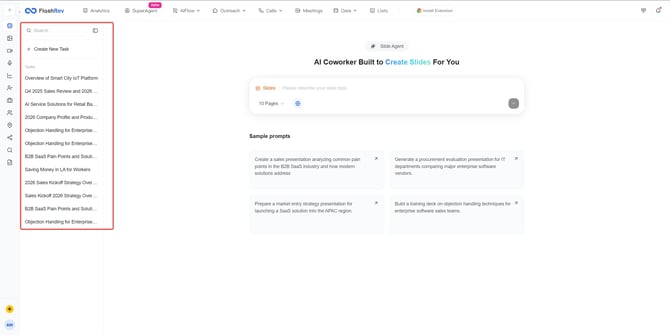
Task History now allows you to revisit every slide-generation task you've created with Slide Agent.
Each task represents a full workflow — including all prompts, refinements, and regenerated versions within that session.
What you can do with Task History:
Reopen any past task
Return to the original context and continue iterating from where you left off.
Continue editing the presentation using prompts
Inside a reopened task, you can:
-
Add new content
-
Refine slides
-
Regenerate updated versions
-
Expand or replace sections
This supports ongoing refinement until your presentation reaches the quality you expect.
Delete tasks you no longer need
Quickly remove outdated tasks to keep your Slide Agent workspace clean and organized.
🎯 Value to Users
Shareable Preview Links
-
Makes distributing your presentations easier and more professional
-
Supports secure sharing through password protection
-
Provides a smooth viewing experience for all recipients
Task History
-
Enables continuous editing over multiple sessions
-
Allows easy re-use and refinement of previously created presentations
-
Keeps all AI-generated slide tasks centralized and manageable
2. Meeting Router Enhancements — Intelligent Language Detection for a More Seamless Global Experience
Meeting Router has been upgraded with smarter internationalization capabilities, ensuring that visitors around the world enjoy a more natural and intuitive booking experience.
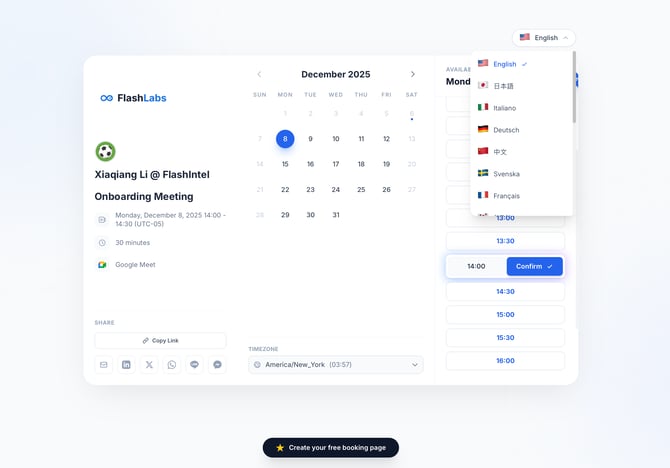
🌍 Multi-Language Interface with Automatic Language Detection
Feature Description
Meeting Router now automatically displays the interface in the visitor’s browser language.
-
If a visitor’s browser is set to Japanese, the booking page will automatically appear in Japanese.
-
If their browser is set to German, the page will load in German, and so on.
Visitors can still manually switch languages at any time using the language selector in the upper-right corner of the booking page.
With automatic language detection plus optional manual switching, Meeting Router now adapts intelligently to your global customers—ensuring everyone can book meetings in the language that feels most natural to them.
3. Calendar Disconnection Handling Optimized
We’ve enhanced how FlashRev responds when a connected calendar (Google Calendar or Outlook Calendar) becomes invalid due to credential or authorization changes.
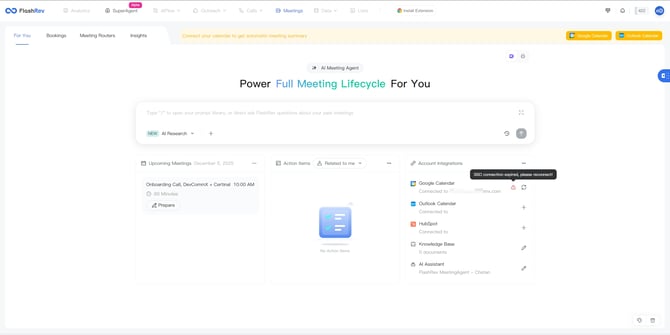
Issue Description
Previously, when users manually changed their Google/Microsoft account password or removed FlashRev from their authorized apps list, the calendar connection would silently fail.
However, the meeting events previously synced into FlashRev were not automatically cleared.
This could result in the meeting bot still attempting to join upcoming meetings - even though the calendar authorization was no longer valid.
What’s Improved
FlashRev now includes a strengthened real-time monitoring mechanism for calendar connection status.
Once the system detects that a connected calendar has become invalid, it will immediately perform the following:
-
Automatically clear all meeting events in FlashRev that were synced from the disconnected calendar
-
Stop dispatching the meeting bot for any meetings associated with that invalid calendar to prevent unintended auto-joining