---
title: FlashRev New Weekly Update [17th November 2025 - 21st November 2025]
description: Full Outlook Calendar & Microsoft Teams integration is here! Support for dual calendars, auto-joining Teams meetings, and faster sync speeds.
---
[Skip to content](https://knowledge.flashintel.ai/en/knowledge/flashrev-new-weekly-update-17th-november-2025-21st-november-2025#main-content)
English
Show submenu for translations
[](https://www.flashlabs.ai/)
Open main navigation
Close main navigation
- English
Show submenu for translations
How can we help you?
- There are no suggestions because the search field is empty.
1. [Knowledge Base](https://knowledge.flashintel.ai/en/knowledge?hsLang=en)
2. [Release Notes](https://knowledge.flashintel.ai/en/knowledge/release-notes?hsLang=en)
3. [November 2025](https://knowledge.flashintel.ai/en/knowledge/release-notes?hsLang=en#november-2025)
# FlashRev New Weekly Update \[17th November 2025 - 21st November 2025\]
FlashRev - Discover
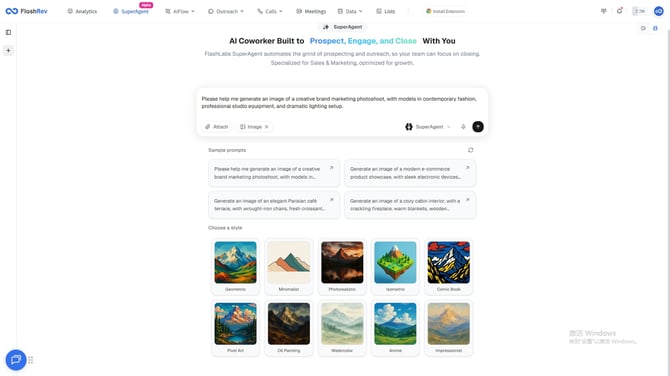
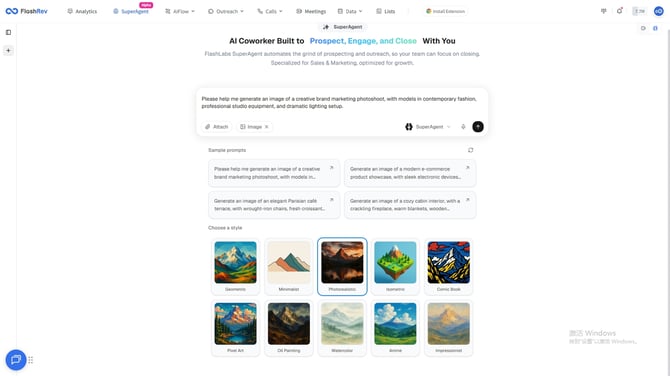
**1.\[Image Feature Interaction Upgrade\] Optimized Style Selection for Enhanced Creative Efficiency**
SuperAgent has introduced a brand-new interaction upgrade for its Image feature. Users can now intuitively select image generation styles directly on the page, enabling more convenient operations and a smoother creative experience. With clearer style categories and improved interaction design, users can quickly find the desired style and freely switch between effects, achieving higher efficiency and better results in visual creation.
**Update Highlights:**
- **Intuitive Style Selection:** Quickly browse and choose different image styles directly on the page, making operations simpler and more visual.
- **Flexible Effect Switching:** Adjust styles according to creative needs to achieve diverse visual outputs.
- **Enhanced Interaction Experience:** Smoother interface layout and workflow for improved overall efficiency.
- **Boosted Creative Efficiency and Expressiveness:** Achieve higher-quality visual creations in less time.
**2.\[Website Feature Upgrade\] SuperAgent Now Supports More Diverse Landing Page Generation for Enhanced User Experience**
SuperAgent has upgraded its Website feature to support the generation of more diverse Landing Pages. Users can now intuitively select different styles within the SuperAgent page tab, and the system will quickly generate a Landing Page corresponding to the chosen style. At the same time, users can create richer and more personalized page content through custom settings, enabling efficient site building and precise presentation.
**Update Highlights:**
- **Diverse Style Options:** A wide range of Landing Page templates to meet various business and design needs.
- **Quick Generation with Customization:** Supports both one-click rapid generation and flexible customization for more personalized page content.
- **Enhanced Interaction Experience:** Intuitive and smooth interface operations reduce the barriers to site building and improve overall efficiency.
- **Improved Presentation and User Experience:** Diverse layouts and styles ensure each Landing Page delivers stronger visual impact and a professional feel.
.png?width=670&height=342&name=image%20(62).png)
**3.\[Comprehensive Model Upgrade\] SuperAgent Introduces Cutting-Edge Models for Enhanced Performance, Choice, and Creative Experience**
SuperAgent continues to expand its intelligent model ecosystem and has officially launched multiple cutting-edge models, including the all-new **Gemini 3** and the advanced image generation model **Nano Banana Pro**. This upgrade provides users with stronger content creation capabilities, richer model choices, and an all-around improvement in web, text, and visual creation experiences.
**Update Highlights:**
- **Enhanced Web Generation:** Gemini 3 can generate high-quality Landing Pages and web content tailored to styles and requirements, with natural layouts and presentation.
- **More Precise Content Creation:** Supports long-form and multi-style content generation, meeting the needs of marketing copy, product descriptions, and various web text content.
- **Flexible and Efficient:** Users can freely choose models based on task requirements, achieving an optimal balance of speed, quality, and cost.
- **Improved Image Generation:** The new image model Nano Banana Pro delivers high-quality, naturally detailed images, offering powerful visual creation capabilities for web design, multimedia content, and other visual projects.
.png?width=670&height=342&name=image%20(63).png)
**4.\[Batch Function Upgrade\] SuperAgent Enhances Bulk Search and Data Processing for Improved User Experience**
SuperAgent has upgraded its batch functionality to support simultaneous searching and processing of more resources and data. Users can now handle dozens of web pages in a single batch, enabling efficient information collection and organization, and providing strong support for data analysis, market research, and business development.
**Update Highlights:**
- **Improved Bulk Search Efficiency:** Supports processing multiple web pages at once for rapid resource collection and integration.
- **Automated Web Crawling Support:** Built-in high-performance crawler automatically extracts content from target pages, reducing manual effort.
- **Convenient and Intuitive Operation:** Optimized batch task management and execution workflow make data collection easy to control.
- **High-Quality Data Output:** Ensures that bulk-collected content is complete and accurate, providing a reliable foundation for subsequent analysis and application.
FlashRev:
**1.Comprehensive Mobile Experience Upgrade: Direct Access to SuperAgent by Default**
To further enhance the mobile user experience, we have optimized the mobile entry point—users on mobile devices will now be automatically redirected to SuperAgent, providing a smoother and smarter integrated experience.
**2.Mobile Permission Prompt Upgrade: Added Notification for No SuperAgent Access**
To improve clarity and usability on mobile, we have added a notification for users without SuperAgent access. When users attempt to use certain features on mobile phones without the required permissions, the system will clearly indicate their status and guide them on the next steps, helping to prevent errors and confusion.
.png?width=670&height=342&name=image%20(64).png)
.png?width=430&height=932&name=image%20(65).png)
.png?width=430&height=932&name=image%20(66).png)
**3.SuperAgent FlashRev Multilingual Support**
To enhance the experience for global users, SuperAgent FlashRev now supports multiple languages, enabling users to efficiently access all features in different language environments and enjoy a smoother, more localized experience.
.png?width=670&height=342&name=image%20(67).png)
.png?width=670&height=345&name=image%20(68).png)
.png?width=670&height=342&name=image%20(70).png)
.png?width=670&height=342&name=image%20(71).png)
FlashRev - Outreach
**1. Meetings Update: Deep Integration with Outlook Calendar and Microsoft Teams**
We’ve completed a major upgrade to FlashRev’s calendar integration service. This update focuses on fully integrating **Outlook Calendar**, expanding support for **Microsoft Teams**, and improving the overall meeting and scheduling experience.
- Full Integration with Outlook Calendar and Microsoft Teams
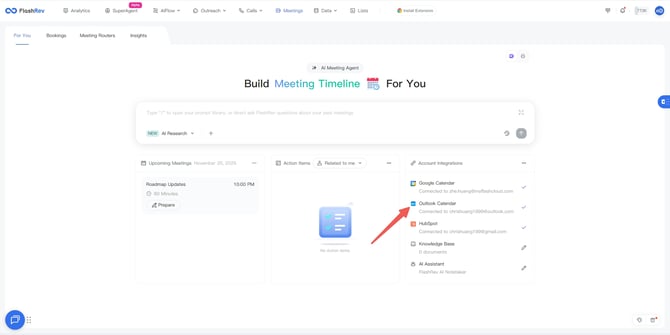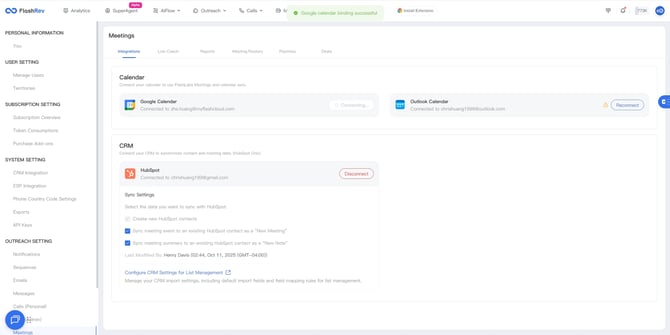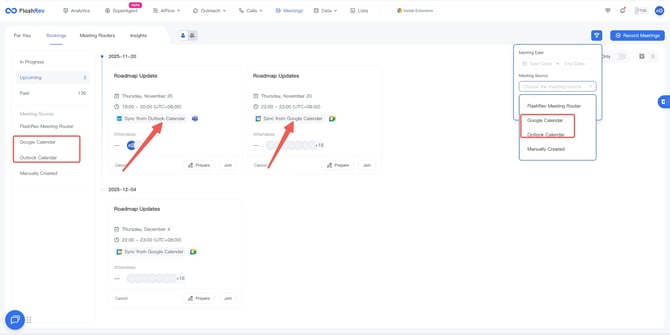
- In addition to the original support for Google Calendar, FlashRev has officially added integration with Outlook Calendar.
- Multiple binding entry points: We added prominent Outlook Calendar binding options in **Meeting → For You**, **Settings → Integrations**, and **Onboarding → Meeting** pages.
- Meeting Booking page: Outlook Calendar options and indicators have been added in the sidebar, filters, and meeting cards.
- Automatic meeting event recognition: After Outlook Calendar is connected, the system will automatically recognize meeting events hosted on Microsoft Teams, and the Meeting Agent will automatically join.
- Meeting Router Calendar Preferences (Dual-Calendar Management)
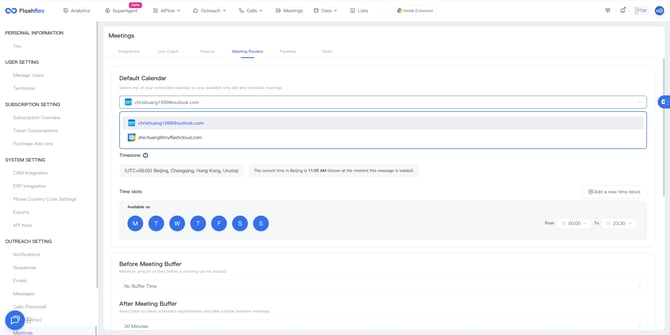
- In **Settings → Meetings → Meeting Routers**, we added a calendar preference selection feature.
- If you have connected both Google and Outlook calendars, you can choose which calendar the meetings booked through Meeting Router should sync to, enabling more refined schedule management.
- User interface and onboarding updates (quickly enable Teams Agent)
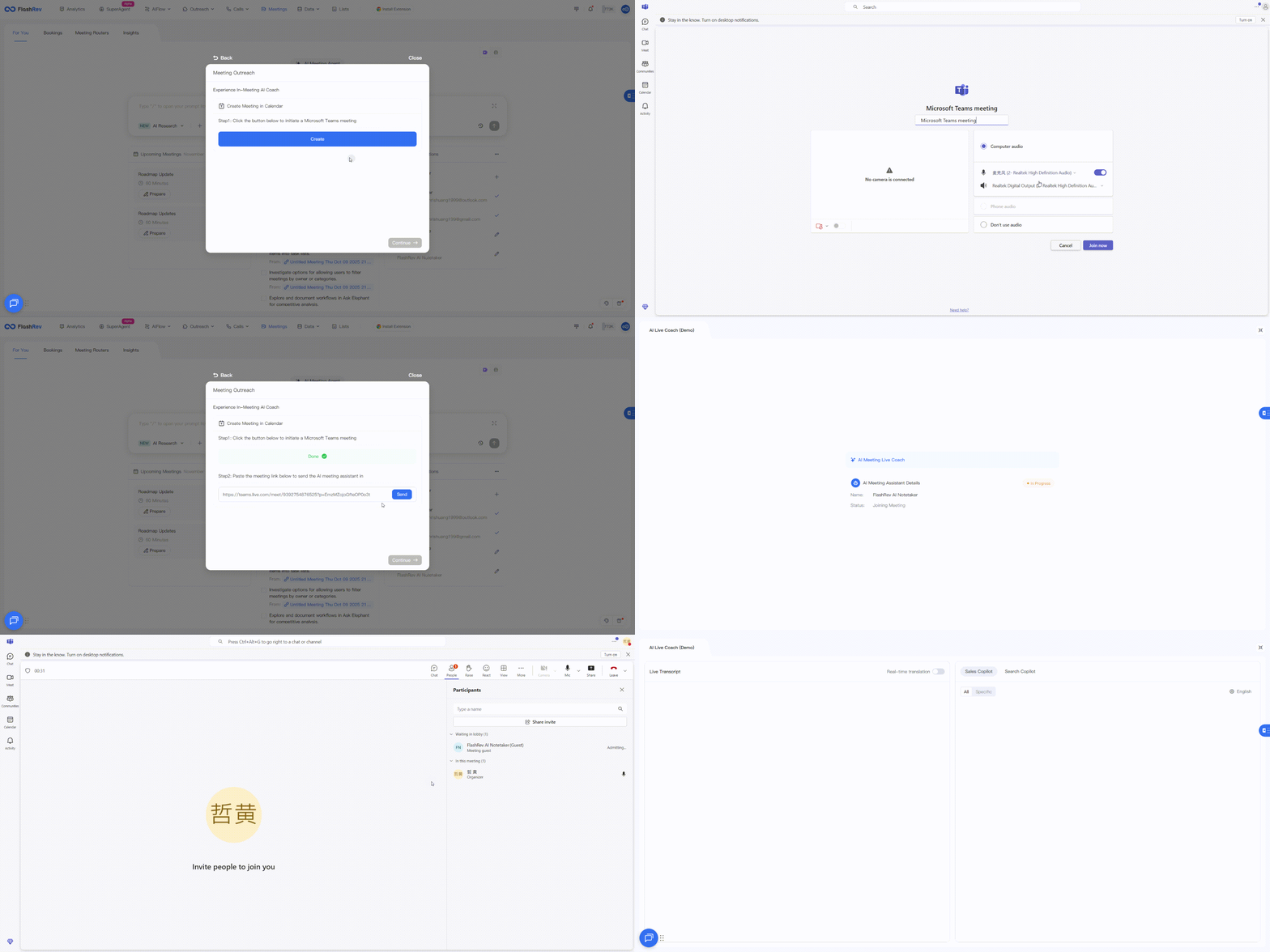
We enhanced the onboarding for Outlook Calendar so you can quickly configure and experience the powerful Meeting Agent features:
- **Onboarding guide:** Added a new guide for binding Outlook Calendar. After successful binding, you can create a Teams meeting with one click and immediately experience the Meeting Agent joining the meeting.
- **Instant Agent experience:** After successfully connecting and creating a Teams meeting, you can immediately experience the Meeting Agent providing strong meeting support (such as meeting recording and summaries).
- Core calendar connection architecture optimization (backend support)
We performed a deep reconstruction of the calendar’s underlying connection service.
This internal optimization ensures that calendar event refresh and synchronization are faster and more reliable, significantly reducing the risk of meeting booking failures or outdated information caused by calendar connection issues.
Tip: For users who already connected Google Calendar, the system will automatically complete the migration to the new optimized architecture in the background. No action is required from you.
Core value and breakthrough upgrades
This comprehensive optimization of the calendar architecture delivers the following key improvements:
- Core feature: Full support for Outlook Calendar and Teams
- Officially added seamless integration with Outlook Calendar, meeting the needs of Microsoft ecosystem users.
- Deep integration with Teams: After connecting Outlook Calendar, the system will automatically detect and use Microsoft Teams as the meeting platform, supporting one-click creation of Teams meetings.
- Comprehensive data coverage
You can now bind both Google Calendar and Outlook Calendar at the same time. FlashRev will retrieve meeting event data from both platforms to ensure your schedule information is complete.
- Improved connection stability and speed (infrastructure enhancement)
- Calendar event sync speed is greatly improved, ensuring the meeting status in FlashRev stays consistent with your calendar.
- Fixed the issue where calendar connections could easily become invalid, ensuring meeting scheduling remains reliable.
- [Get Started](https://knowledge.flashintel.ai/en/knowledge/get-started?hsLang=en#main-content)
- [GTM - Go-to-Market Basics](https://knowledge.flashintel.ai/en/knowledge/get-started?hsLang=en#gtm-go-to-market-basics)
- [Discover Tab](https://knowledge.flashintel.ai/en/knowledge/discover-tab?hsLang=en#main-content)
- [People Search](https://knowledge.flashintel.ai/en/knowledge/discover-tab?hsLang=en#people-search)
- [Company Search](https://knowledge.flashintel.ai/en/knowledge/discover-tab?hsLang=en#company-search)
- [In-Market-Timing Engine](https://knowledge.flashintel.ai/en/knowledge/discover-tab?hsLang=en#in-market-timing-engine)
- [Data Governance](https://knowledge.flashintel.ai/en/knowledge/discover-tab?hsLang=en#data-governance)
- [Engage Tab](https://knowledge.flashintel.ai/en/knowledge/engage-tab?hsLang=en#main-content)
- [Deliverability Strategies](https://knowledge.flashintel.ai/en/knowledge/engage-tab?hsLang=en#deliverability-strategies)
- [Parallel-Dialer](https://knowledge.flashintel.ai/en/knowledge/engage-tab?hsLang=en#parallel-dialer)
- [Sequences](https://knowledge.flashintel.ai/en/knowledge/engage-tab?hsLang=en#sequences)
- [Connection Guide](https://knowledge.flashintel.ai/en/knowledge/engage-tab?hsLang=en#connection-guide)
- [Meetings](https://knowledge.flashintel.ai/en/knowledge/engage-tab?hsLang=en#meetings)
- [LinkedIn Automation](https://knowledge.flashintel.ai/en/knowledge/engage-tab?hsLang=en#linkedin-automation)
- [List Tab](https://knowledge.flashintel.ai/en/knowledge/list-tab?hsLang=en#main-content)
- [List Management](https://knowledge.flashintel.ai/en/knowledge/list-tab?hsLang=en#list-management)
- [CSV Enrichment](https://knowledge.flashintel.ai/en/knowledge/list-tab?hsLang=en#csv-enrichment)
- [CRM List](https://knowledge.flashintel.ai/en/knowledge/list-tab?hsLang=en#crm-list)
- [Integrations](https://knowledge.flashintel.ai/en/knowledge/integrations?hsLang=en#main-content)
- [Zapier](https://knowledge.flashintel.ai/en/knowledge/integrations?hsLang=en#zapier)
- [HubSpot](https://knowledge.flashintel.ai/en/knowledge/integrations?hsLang=en#hubspot)
- [App and Extension](https://knowledge.flashintel.ai/en/knowledge/app-and-extension?hsLang=en#main-content)
- [Chrome Extension](https://knowledge.flashintel.ai/en/knowledge/app-and-extension?hsLang=en#chrome-extension)
- [Strategies](https://knowledge.flashintel.ai/en/knowledge/strategies?hsLang=en#main-content)
- [Account-based Marketing](https://knowledge.flashintel.ai/en/knowledge/strategies?hsLang=en#account-based-marketing)
- [Tutorial & Walkthrough Videos](https://knowledge.flashintel.ai/en/knowledge/tutorial-walkthrough-videos?hsLang=en#main-content)
- [Onboarding](https://knowledge.flashintel.ai/en/knowledge/tutorial-walkthrough-videos?hsLang=en#onboarding)
- [Release Notes](https://knowledge.flashintel.ai/en/knowledge/release-notes?hsLang=en#main-content)
- [August 2023](https://knowledge.flashintel.ai/en/knowledge/release-notes?hsLang=en#august-2023)
- [September 2023](https://knowledge.flashintel.ai/en/knowledge/release-notes?hsLang=en#september-2023)
- [October 2023](https://knowledge.flashintel.ai/en/knowledge/release-notes?hsLang=en#october-2023)
- [November 2023](https://knowledge.flashintel.ai/en/knowledge/release-notes?hsLang=en#november-2023)
- [December 2023](https://knowledge.flashintel.ai/en/knowledge/release-notes?hsLang=en#december-2023)
- [January 2024](https://knowledge.flashintel.ai/en/knowledge/release-notes?hsLang=en#january-2024)
- [February 2024](https://knowledge.flashintel.ai/en/knowledge/release-notes?hsLang=en#february-2024)
- [March 2024](https://knowledge.flashintel.ai/en/knowledge/release-notes?hsLang=en#march-2024)
- [April 2024](https://knowledge.flashintel.ai/en/knowledge/release-notes?hsLang=en#april-2024)
- [May 2024](https://knowledge.flashintel.ai/en/knowledge/release-notes?hsLang=en#may-2024)
- [June 2024](https://knowledge.flashintel.ai/en/knowledge/release-notes?hsLang=en#june-2024)
- [July 2024](https://knowledge.flashintel.ai/en/knowledge/release-notes?hsLang=en#july-2024)
- [August 2024](https://knowledge.flashintel.ai/en/knowledge/release-notes?hsLang=en#august-2024)
- [September 2024](https://knowledge.flashintel.ai/en/knowledge/release-notes?hsLang=en#september-2024)
- [October 2024](https://knowledge.flashintel.ai/en/knowledge/release-notes?hsLang=en#october-2024)
- [November 2024](https://knowledge.flashintel.ai/en/knowledge/release-notes?hsLang=en#november-2024)
- [December 2024](https://knowledge.flashintel.ai/en/knowledge/release-notes?hsLang=en#december-2024)
- [January 2025](https://knowledge.flashintel.ai/en/knowledge/release-notes?hsLang=en#january-2025)
- [February 2025](https://knowledge.flashintel.ai/en/knowledge/release-notes?hsLang=en#february-2025)
- [March 2025](https://knowledge.flashintel.ai/en/knowledge/release-notes?hsLang=en#march-2025)
- [April 2025](https://knowledge.flashintel.ai/en/knowledge/release-notes?hsLang=en#april-2025)
- [May 2025](https://knowledge.flashintel.ai/en/knowledge/release-notes?hsLang=en#may-2025)
- [June 2025](https://knowledge.flashintel.ai/en/knowledge/release-notes?hsLang=en#june-2025)
- [July 2025](https://knowledge.flashintel.ai/en/knowledge/release-notes?hsLang=en#july-2025)
- [August 2025](https://knowledge.flashintel.ai/en/knowledge/release-notes?hsLang=en#august-2025)
- [September 2025](https://knowledge.flashintel.ai/en/knowledge/release-notes?hsLang=en#september-2025)
- [October 2025](https://knowledge.flashintel.ai/en/knowledge/release-notes?hsLang=en#october-2025)
- [November 2025](https://knowledge.flashintel.ai/en/knowledge/release-notes?hsLang=en#november-2025)
- [December 2025](https://knowledge.flashintel.ai/en/knowledge/release-notes?hsLang=en#december-2025)
- [January 2026](https://knowledge.flashintel.ai/en/knowledge/release-notes?hsLang=en#january-2026)
- [February 2026](https://knowledge.flashintel.ai/en/knowledge/release-notes?hsLang=en#february-2026)
- [March 2026](https://knowledge.flashintel.ai/en/knowledge/release-notes?hsLang=en#march-2026)
- [Contact us](https://knowledge.flashintel.ai/en/knowledge/contact-us?hsLang=en)
[](https://knowledge.flashintel.ai/?hsLang=en)
FlashLabs Knowledge Base
© 2026 FlashLabs AI
```json
{
"@context" : "https://schema.org",
"@type" : "VideoObject",
"contentUrl" : "https://22606445.fs1.hubspotusercontent-na1.net/hubfs/22606445/20251121213445_rec_.mp4",
"dateModified" : "2025-12-08T08:33:35.199Z",
"duration" : "PT18S",
"height" : 978,
"name" : "20251121213445_rec_",
"thumbnailUrl" : "https://22606445.fs1.hubspotusercontent-na1.net/hubfs/22606445/20251121213445_rec_.mp4/medium.jpg?t=1765182815199",
"uploadDate" : "2025-12-08T08:33:24.120Z",
"width" : 1918
}
```
```json
{
"@context" : "https://schema.org",
"@type" : "VideoObject",
"contentUrl" : "https://22606445.fs1.hubspotusercontent-na1.net/hubfs/22606445/w46_engage_06.mp4",
"dateModified" : "2025-11-22T15:42:21.656Z",
"duration" : "PT42S",
"height" : 960,
"name" : "w46_engage_06",
"thumbnailUrl" : "https://22606445.fs1.hubspotusercontent-na1.net/hubfs/22606445/w46_engage_06.mp4/medium.jpg?t=1763826141656",
"uploadDate" : "2025-11-22T15:42:10.583Z",
"width" : 1918
}
```