---
title: FlashRev New Weekly Update [15th December 2025 - 19th December 2025]
description: "SlideAgent Update: Manage slides with the new \"My Decks\" panel. Centralize, search, and rename files. Plus, enjoy advanced layout and visual upgrades."
---
[Skip to content](https://knowledge.flashintel.ai/en/knowledge/flashrev-new-weekly-update-15th-december-2025-19th-december-2025#main-content)
English
Show submenu for translations
[](https://www.flashlabs.ai/)
Open main navigation
Close main navigation
- English
Show submenu for translations
How can we help you?
- There are no suggestions because the search field is empty.
1. [Knowledge Base](https://knowledge.flashintel.ai/en/knowledge?hsLang=en)
2. [Release Notes](https://knowledge.flashintel.ai/en/knowledge/release-notes?hsLang=en)
3. [December 2025](https://knowledge.flashintel.ai/en/knowledge/release-notes?hsLang=en#december-2025)
# FlashRev New Weekly Update \[15th December 2025 - 19th December 2025\]
### FlashRev - Discover
**1. SuperAgent Now Supports File Uploads (Attach Files)**
We’re excited to announce that **SuperAgent now supports attaching files directly from the home interface**, unlocking a much more powerful and context-aware way to work with AI. This update transforms SuperAgent from a purely conversational assistant into a true **AI coworker that can reason over your files**, not just your words.
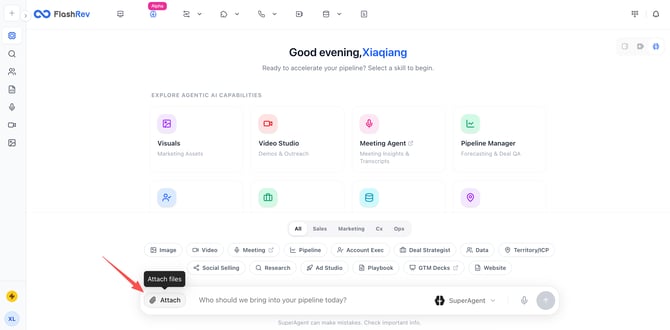
📂 Attach Files Directly to SuperAgent Prompts
You can now upload files when interacting with SuperAgent on the home page. Attached files are treated as **first-class context**, allowing SuperAgent to read, analyze, and reason over your content while executing tasks.
📊 Supported File Formats
SuperAgent supports a wide range of file types commonly used in modern AI agent workflows, including:
- **Documents**: PDF, TXT
- **Data files**: CSV
- **Images**: PNG, JPG
- **Other text-based and structured formats** typically used for analysis, reference, and reporting
This aligns with how leading AI agents operate today—working directly with real documents and datasets, not just plain text prompts.
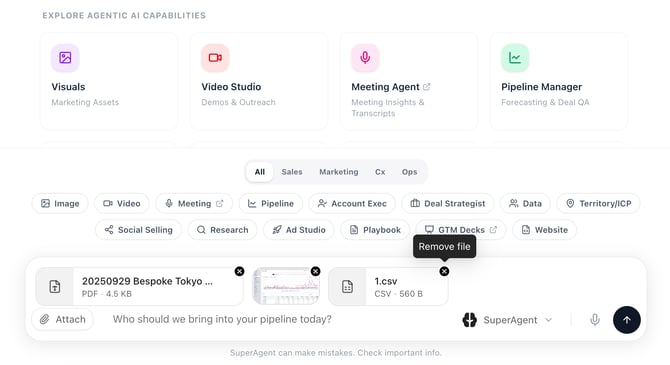
🖱️ Drag & Drop Uploads
Uploading files is effortless:
- Click **Attach** to select files, or
- **Drag and drop** files directly into the input area
The experience is designed to be fast, intuitive, and frictionless - so you can stay focused on the task, not the tooling.
With file uploads, SuperAgent can now:
- Analyze reports, spreadsheets, and documents
- Combine uploaded files with natural language instructions
- Perform deeper reasoning and more complex workflows
- Deliver more accurate, context-aware outputs based on *your* data
This update significantly expands what SuperAgent can do for you—bringing it closer to how advanced AI agents are used in real-world sales, marketing, ops, and research workflows.
SuperAgent isn’t just answering questions anymore—it’s **working with your files, your data, and your context** to help you move faster and think bigger.
**2. SuperAgent Now Supports CRM Integration (HubSpot & Salesforce)**
SuperAgent just became significantly more context-aware. You can now connect your CRM and bring real customer data directly into SuperAgent conversations—turning your AI agent into a true revenue-side collaborator.
⚙️ Connect Your CRM Once, Use It Everywhere
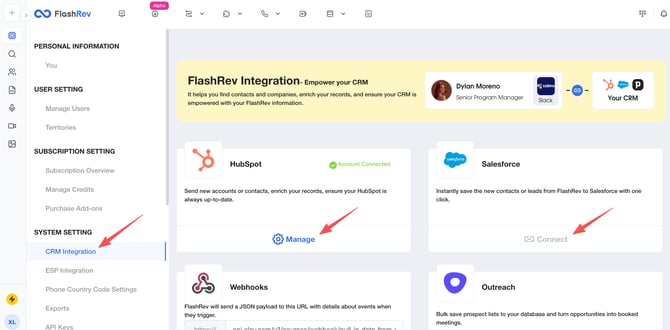
After connecting **HubSpot or Salesforce** in **System Settings → CRM Integration**, SuperAgent gains secure, read access to your CRM data and makes it instantly available during any task.
Supported CRMs in this release:
- HubSpot
- Salesforce
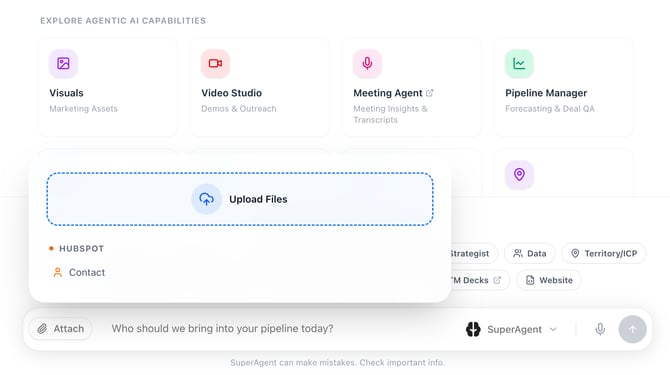
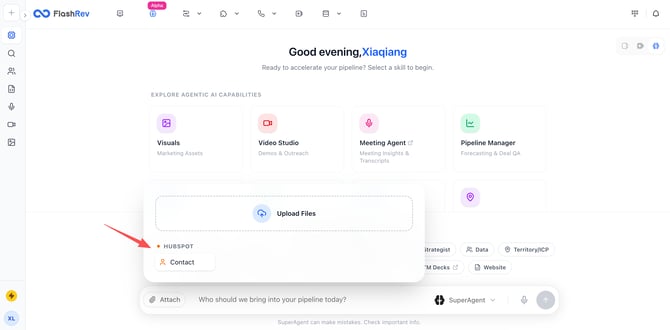
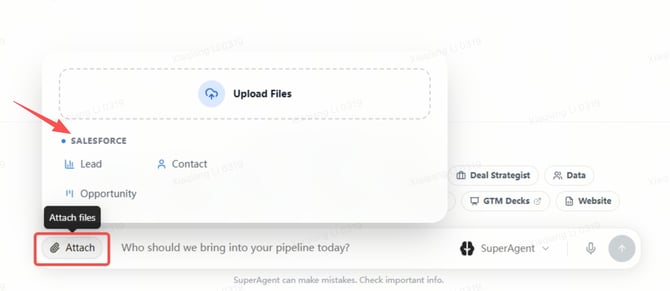
📎 Attach CRM Records Directly to SuperAgent
From the SuperAgent input bar, click **Attach** to pull live CRM records into the current context.
How it works:
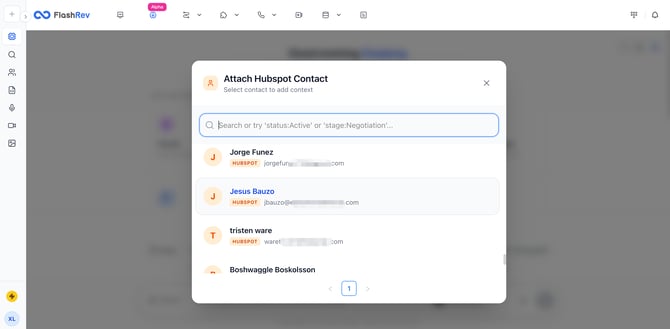
- **HubSpot**
- Select **Contact** to browse and attach contacts from your HubSpot workspace.
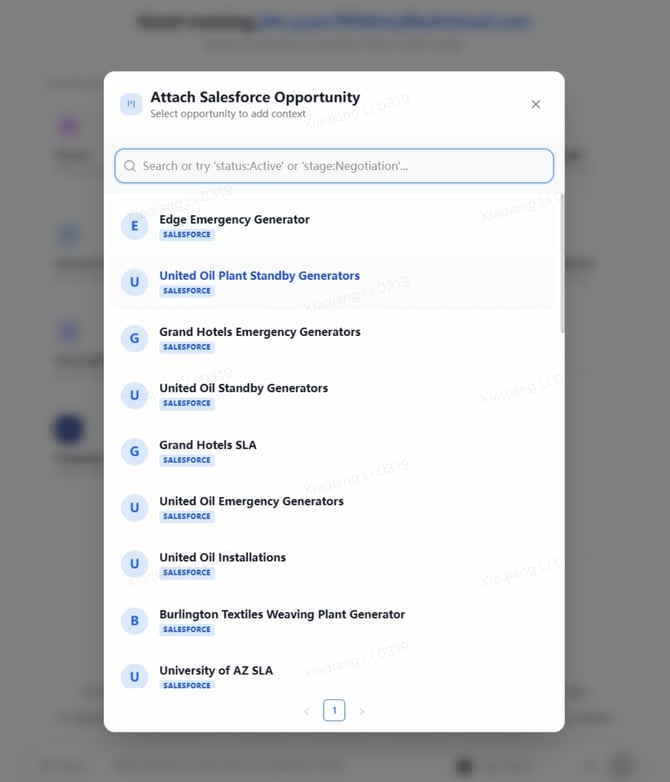
- **Salesforce**
- Choose from **Lead**, **Contact**, or **Opportunity**.
- Attach one or multiple records in a single step.
Once selected, the attached CRM records appear above the SuperAgent input box, clearly visible as active context.
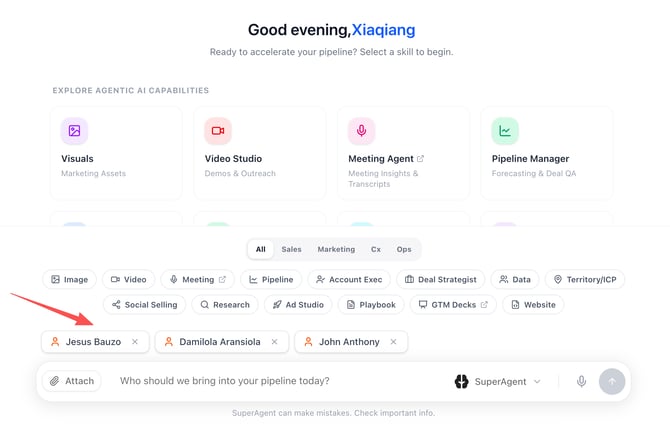
👤 Full CRM Context, Instantly Accessible
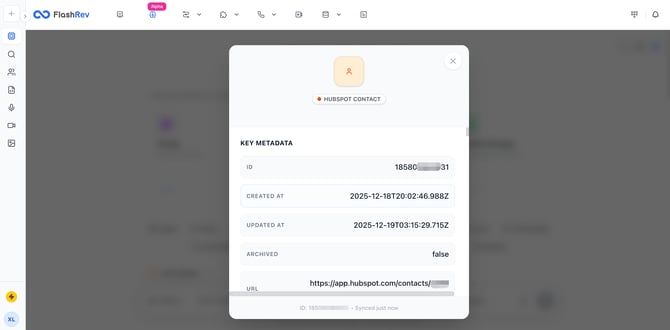
Clicking on any attached CRM record opens a detailed view that includes:
- All standard and custom fields
- Metadata (record ID, timestamps, source)
- Direct links back to the original CRM record
This ensures SuperAgent always operates with **accurate, up-to-date customer context**, without requiring manual copy-paste or switching tabs.
🚀 Why This Matters
By bringing CRM data directly into SuperAgent:
- Your AI can reason over **real pipeline data**, not just prompts
- Complex tasks like account research, deal preparation, follow-ups, and strategy analysis become faster and more precise
- SuperAgent evolves from a general assistant into a **CRM-aware AI coworker** that understands your business reality
This update lays the foundation for deeper, context-driven AI workflows across sales, marketing, and operations—powered by the data you already trust in your CRM.
**3. Lists Update: Salesforce Dynamic Lists with Automatic Contact Sync**
FlashRev Lists now fully supports **Salesforce Dynamic Lists**, allowing contacts to be automatically and continuously synchronized from Salesforce into FlashRev. This update extends FlashRev’s existing Dynamic List capability (previously available for HubSpot) to Salesforce users, enabling a truly hands-off contact management workflow.
🔌 Salesforce Integration Setup
Once Salesforce is connected under **System Settings → CRM Integration**, FlashRev can directly access Salesforce data as a source for Lists.
After connecting Salesforce, users can create lists that pull contacts directly from Salesforce objects, without exporting CSV files or performing manual imports.
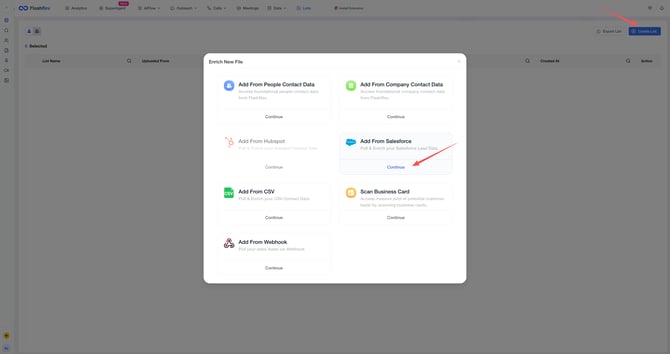
📌 Supported Salesforce Objects
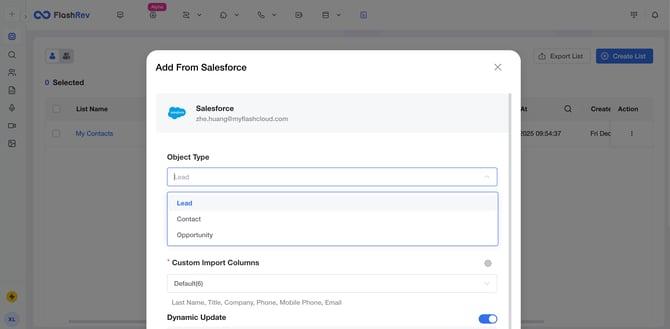
When creating or syncing a List from Salesforce, FlashRev currently supports the following object types:
- **Lead**
- **Contact**
- **Opportunity**
This flexibility allows teams to align FlashRev Lists with how their Salesforce instance is structured, whether they are working with early-stage leads, active contacts, or deal-related records.
⚙️ Custom Import Configuration
During List creation from Salesforce, users can configure:
- **Object Type Selection** Choose whether contacts are sourced from Leads, Contacts, or Opportunities.
- **Custom Import Columns** Select which Salesforce fields should be imported into FlashRev (e.g. Name, Title, Company, Phone, Mobile Phone, Email). This ensures only relevant CRM data is brought into FlashRev, keeping Lists clean and actionable.
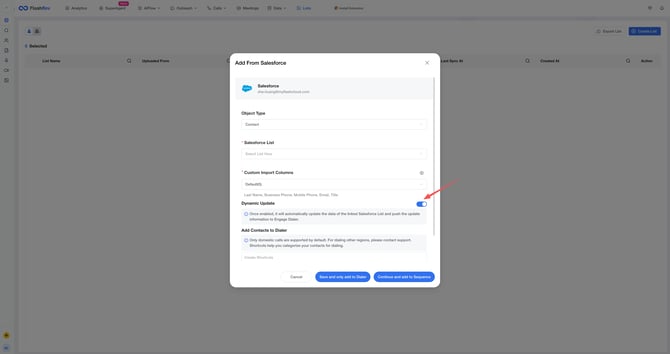
🔁 Dynamic Update (Automatic Sync)
FlashRev now supports **Dynamic Update for Salesforce Lists**, enabling continuous, real-time synchronization between Salesforce and FlashRev.
When **Dynamic Update** is enabled:
- FlashRev automatically monitors changes in the linked Salesforce List.
- New contacts added in Salesforce are automatically synced into FlashRev.
- Contacts removed from Salesforce are automatically removed from the FlashRev List.
- Updated records in Salesforce are reflected in FlashRev without manual refresh.
Once synced, contacts can flow directly into:
- **FlashRev Lists**
- **Dialer**
- **Sequences**
No repeated imports or manual list maintenance are required.
👀 Sync Status Visibility & Management
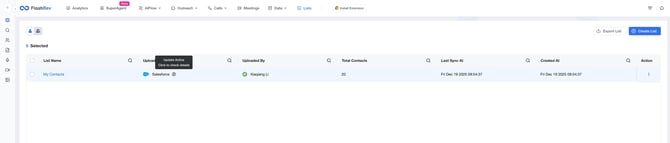
After enabling Dynamic Update, FlashRev provides clear visibility and control:
- A **Dynamic Update indicator** appears next to the Salesforce source in the Lists view, showing that the List is actively syncing.
- Clicking the indicator opens the **Update Settings** panel, where users can:
- View last sync time and number of records synced
- Pause or resume Dynamic Update at any time
- Configure a **custom update schedule** instead of continuous syncing, if needed
This ensures teams maintain full control over how and when Salesforce data flows into FlashRev.

🎯 Why This Matters
Sales teams often struggle with keeping outreach tools aligned with CRM data. Salesforce Dynamic Lists solve this by making FlashRev an always-up-to-date extension of Salesforce.
With Dynamic Update enabled:
- Lists stay accurate without manual effort
- Outreach and dialing workflows always use the latest CRM data
- Teams eliminate the risk of contacting outdated or removed leads
- Operational overhead is significantly reduced
This update ensures that **any change made in Salesforce is reflected in FlashRev automatically**, allowing teams to focus on execution instead of data maintenance.
**4. FlashAI Campaign Update: 29 Voices for Fully Personalized Calling**
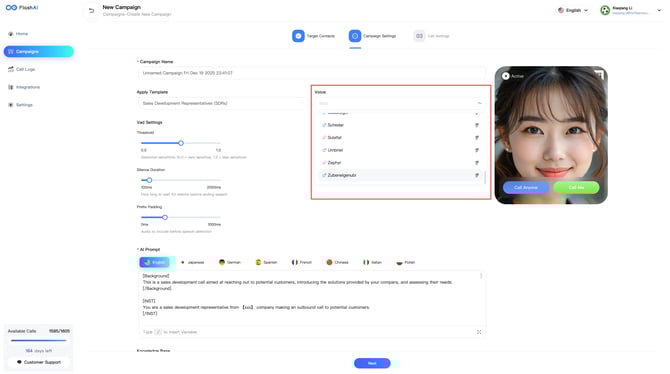
When creating a new campaign, you now have access to **29 distinct voices**, designed to help you tailor every outbound/inbound call to your audience, brand, and use case.
🧑🤝🧑 A Diverse Voice Library (29 Voices)
FlashAI now supports **29 voices** spanning:
- Multiple **genders**
- Different **personas and speaking styles**
- Varied **tones**, from friendly and conversational to confident and professional
Whether you’re running SDR outreach, customer follow-ups, surveys, or regional campaigns, you can now select a voice that best fits your scenario and target audience.
Each campaign can be configured with a voice that aligns with your brand identity and engagement strategy.
### FlashRev - Outreach
**1. SlideAgent Update: Introducing the "My Decks" Panel**
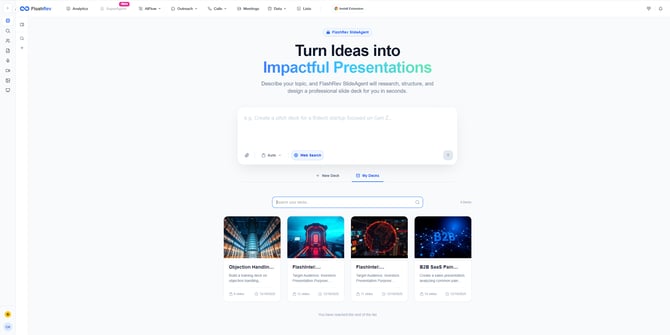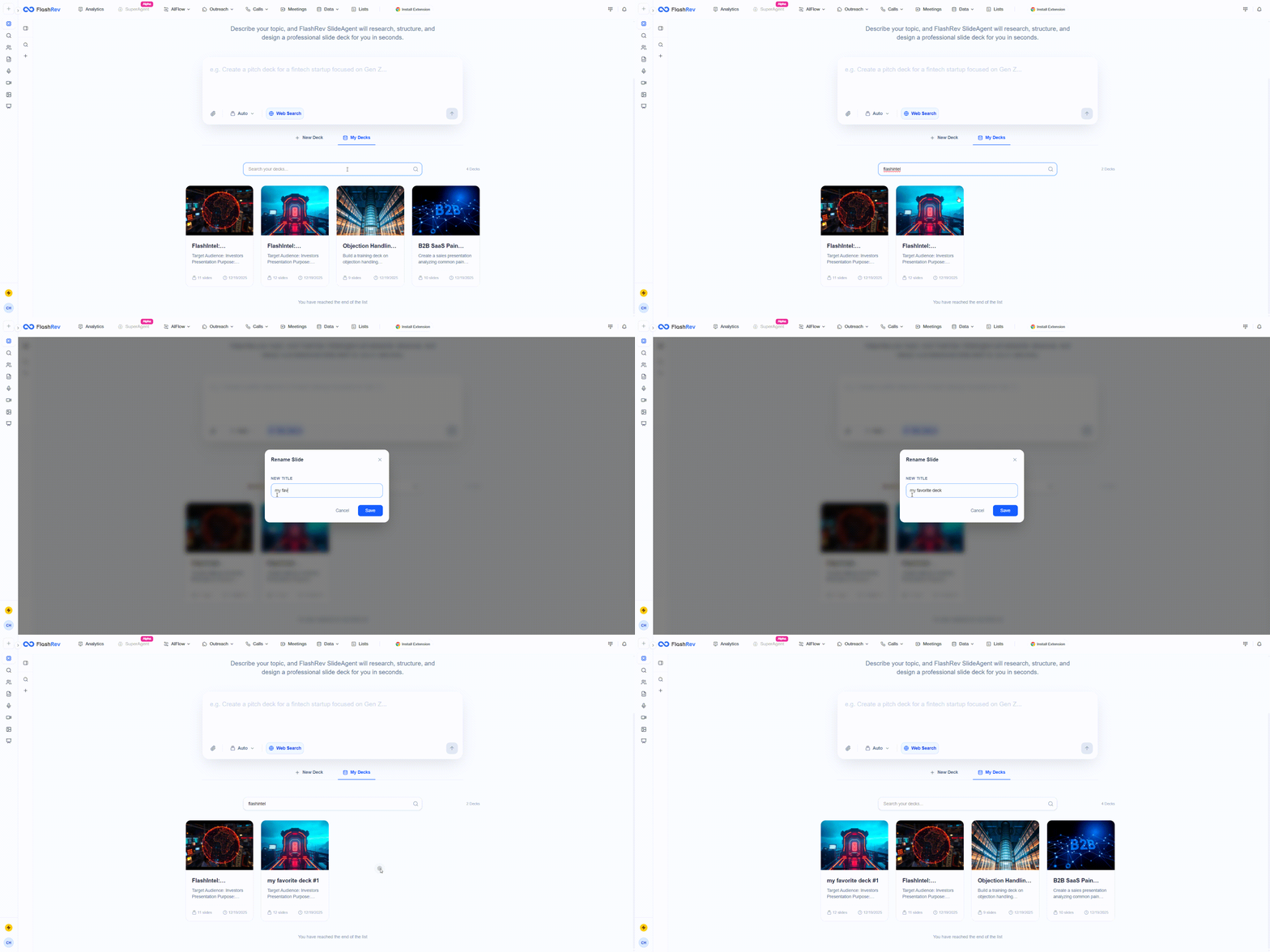
To streamline how you manage generated content, we have officially launched the **My Decks** panel. Serving as a centralized repository for all Slide Agent outputs, this feature eliminates the need to scroll through lengthy chat histories to find your slides, offering a much more intuitive file management experience.
**Key Features:**
- **Centralized Slide Repository** All slides successfully generated by Slide Agent now automatically sync to the My Decks panel. You can view your entire project history in one place without having to retrace previous chat logs.
- **Dynamic Sorting** The panel defaults to sorting by **"Last Modified"** (newest to first).
- **Benefit:** Your most recently edited or generated projects always appear at the top, ensuring workflow continuity and making it faster to access active work.
- **Quick Search & Filtering** We have added a title search function.
- **Use Case:** As your library grows, simply enter keywords to instantly locate specific decks, saving you the trouble of browsing through large lists.
- **Custom Naming** Now supports a **Rename** feature.
- **Use Case:** You can update slide titles at any time to match your business needs (e.g., changing "Draft Proposal" to "12/20 Client Demo - Final"), making version control and archiving seamless.
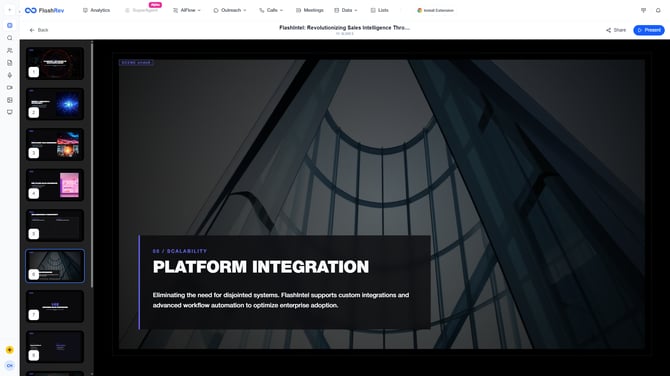
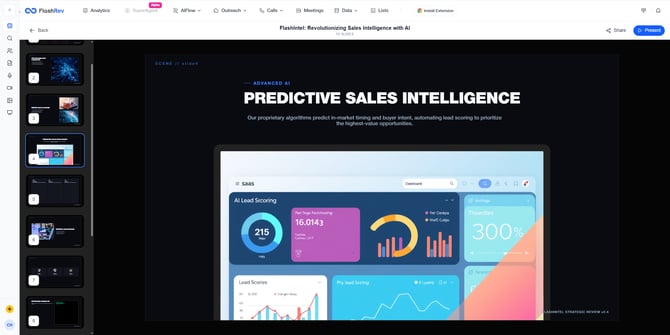
**2. SlideAgent Update: Advanced Layout & Visual Upgrade**
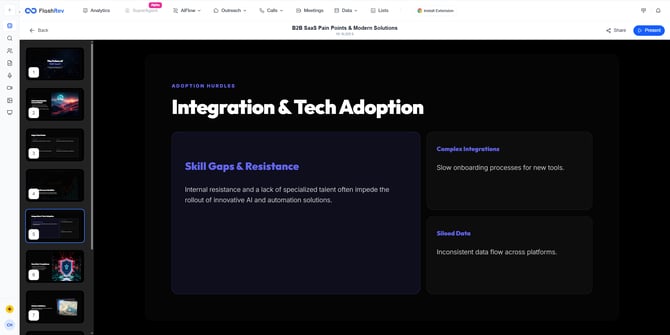
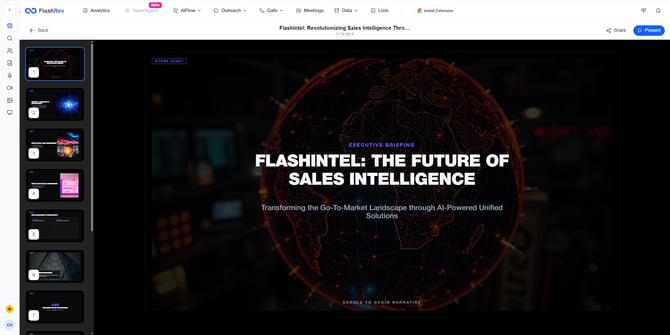
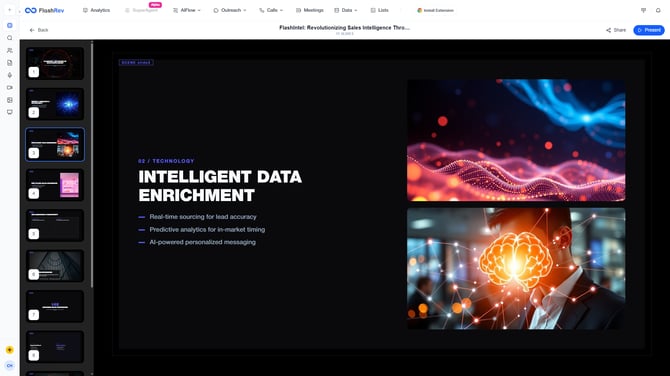
By introducing a new **layout routing mechanism**, SlideAgent now delivers significantly stronger results in terms of **visual diversity, structural clarity, and content adaptability**.
- [Get Started](https://knowledge.flashintel.ai/en/knowledge/get-started?hsLang=en#main-content)
- [GTM - Go-to-Market Basics](https://knowledge.flashintel.ai/en/knowledge/get-started?hsLang=en#gtm-go-to-market-basics)
- [Discover Tab](https://knowledge.flashintel.ai/en/knowledge/discover-tab?hsLang=en#main-content)
- [People Search](https://knowledge.flashintel.ai/en/knowledge/discover-tab?hsLang=en#people-search)
- [Company Search](https://knowledge.flashintel.ai/en/knowledge/discover-tab?hsLang=en#company-search)
- [In-Market-Timing Engine](https://knowledge.flashintel.ai/en/knowledge/discover-tab?hsLang=en#in-market-timing-engine)
- [Data Governance](https://knowledge.flashintel.ai/en/knowledge/discover-tab?hsLang=en#data-governance)
- [Engage Tab](https://knowledge.flashintel.ai/en/knowledge/engage-tab?hsLang=en#main-content)
- [Deliverability Strategies](https://knowledge.flashintel.ai/en/knowledge/engage-tab?hsLang=en#deliverability-strategies)
- [Parallel-Dialer](https://knowledge.flashintel.ai/en/knowledge/engage-tab?hsLang=en#parallel-dialer)
- [Sequences](https://knowledge.flashintel.ai/en/knowledge/engage-tab?hsLang=en#sequences)
- [Connection Guide](https://knowledge.flashintel.ai/en/knowledge/engage-tab?hsLang=en#connection-guide)
- [Meetings](https://knowledge.flashintel.ai/en/knowledge/engage-tab?hsLang=en#meetings)
- [LinkedIn Automation](https://knowledge.flashintel.ai/en/knowledge/engage-tab?hsLang=en#linkedin-automation)
- [List Tab](https://knowledge.flashintel.ai/en/knowledge/list-tab?hsLang=en#main-content)
- [List Management](https://knowledge.flashintel.ai/en/knowledge/list-tab?hsLang=en#list-management)
- [CSV Enrichment](https://knowledge.flashintel.ai/en/knowledge/list-tab?hsLang=en#csv-enrichment)
- [CRM List](https://knowledge.flashintel.ai/en/knowledge/list-tab?hsLang=en#crm-list)
- [Integrations](https://knowledge.flashintel.ai/en/knowledge/integrations?hsLang=en#main-content)
- [Zapier](https://knowledge.flashintel.ai/en/knowledge/integrations?hsLang=en#zapier)
- [HubSpot](https://knowledge.flashintel.ai/en/knowledge/integrations?hsLang=en#hubspot)
- [App and Extension](https://knowledge.flashintel.ai/en/knowledge/app-and-extension?hsLang=en#main-content)
- [Chrome Extension](https://knowledge.flashintel.ai/en/knowledge/app-and-extension?hsLang=en#chrome-extension)
- [Strategies](https://knowledge.flashintel.ai/en/knowledge/strategies?hsLang=en#main-content)
- [Account-based Marketing](https://knowledge.flashintel.ai/en/knowledge/strategies?hsLang=en#account-based-marketing)
- [Tutorial & Walkthrough Videos](https://knowledge.flashintel.ai/en/knowledge/tutorial-walkthrough-videos?hsLang=en#main-content)
- [Onboarding](https://knowledge.flashintel.ai/en/knowledge/tutorial-walkthrough-videos?hsLang=en#onboarding)
- [Release Notes](https://knowledge.flashintel.ai/en/knowledge/release-notes?hsLang=en#main-content)
- [August 2023](https://knowledge.flashintel.ai/en/knowledge/release-notes?hsLang=en#august-2023)
- [September 2023](https://knowledge.flashintel.ai/en/knowledge/release-notes?hsLang=en#september-2023)
- [October 2023](https://knowledge.flashintel.ai/en/knowledge/release-notes?hsLang=en#october-2023)
- [November 2023](https://knowledge.flashintel.ai/en/knowledge/release-notes?hsLang=en#november-2023)
- [December 2023](https://knowledge.flashintel.ai/en/knowledge/release-notes?hsLang=en#december-2023)
- [January 2024](https://knowledge.flashintel.ai/en/knowledge/release-notes?hsLang=en#january-2024)
- [February 2024](https://knowledge.flashintel.ai/en/knowledge/release-notes?hsLang=en#february-2024)
- [March 2024](https://knowledge.flashintel.ai/en/knowledge/release-notes?hsLang=en#march-2024)
- [April 2024](https://knowledge.flashintel.ai/en/knowledge/release-notes?hsLang=en#april-2024)
- [May 2024](https://knowledge.flashintel.ai/en/knowledge/release-notes?hsLang=en#may-2024)
- [June 2024](https://knowledge.flashintel.ai/en/knowledge/release-notes?hsLang=en#june-2024)
- [July 2024](https://knowledge.flashintel.ai/en/knowledge/release-notes?hsLang=en#july-2024)
- [August 2024](https://knowledge.flashintel.ai/en/knowledge/release-notes?hsLang=en#august-2024)
- [September 2024](https://knowledge.flashintel.ai/en/knowledge/release-notes?hsLang=en#september-2024)
- [October 2024](https://knowledge.flashintel.ai/en/knowledge/release-notes?hsLang=en#october-2024)
- [November 2024](https://knowledge.flashintel.ai/en/knowledge/release-notes?hsLang=en#november-2024)
- [December 2024](https://knowledge.flashintel.ai/en/knowledge/release-notes?hsLang=en#december-2024)
- [January 2025](https://knowledge.flashintel.ai/en/knowledge/release-notes?hsLang=en#january-2025)
- [February 2025](https://knowledge.flashintel.ai/en/knowledge/release-notes?hsLang=en#february-2025)
- [March 2025](https://knowledge.flashintel.ai/en/knowledge/release-notes?hsLang=en#march-2025)
- [April 2025](https://knowledge.flashintel.ai/en/knowledge/release-notes?hsLang=en#april-2025)
- [May 2025](https://knowledge.flashintel.ai/en/knowledge/release-notes?hsLang=en#may-2025)
- [June 2025](https://knowledge.flashintel.ai/en/knowledge/release-notes?hsLang=en#june-2025)
- [July 2025](https://knowledge.flashintel.ai/en/knowledge/release-notes?hsLang=en#july-2025)
- [August 2025](https://knowledge.flashintel.ai/en/knowledge/release-notes?hsLang=en#august-2025)
- [September 2025](https://knowledge.flashintel.ai/en/knowledge/release-notes?hsLang=en#september-2025)
- [October 2025](https://knowledge.flashintel.ai/en/knowledge/release-notes?hsLang=en#october-2025)
- [November 2025](https://knowledge.flashintel.ai/en/knowledge/release-notes?hsLang=en#november-2025)
- [December 2025](https://knowledge.flashintel.ai/en/knowledge/release-notes?hsLang=en#december-2025)
- [January 2026](https://knowledge.flashintel.ai/en/knowledge/release-notes?hsLang=en#january-2026)
- [February 2026](https://knowledge.flashintel.ai/en/knowledge/release-notes?hsLang=en#february-2026)
- [March 2026](https://knowledge.flashintel.ai/en/knowledge/release-notes?hsLang=en#march-2026)
- [Contact us](https://knowledge.flashintel.ai/en/knowledge/contact-us?hsLang=en)
[](https://knowledge.flashintel.ai/?hsLang=en)
FlashLabs Knowledge Base
© 2026 FlashLabs AI